A viewer that closes with No matching security types, or a server that drops you before any password prompt, failed at the RFB security handshake: the list of types the server advertised holds nothing the viewer implements. Both ends log what they offered and what they picked, so read those lines before you change any config.
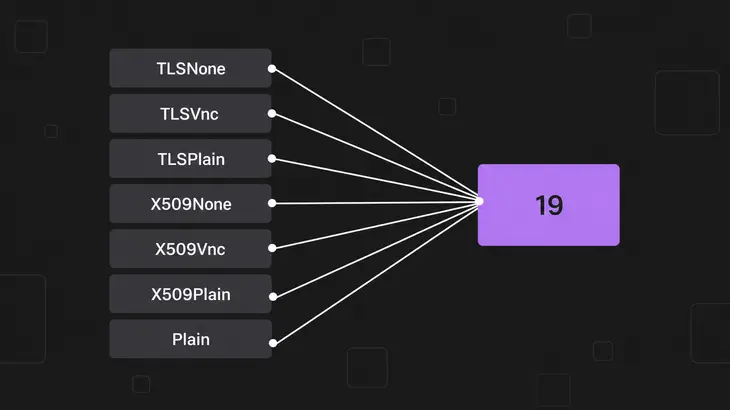
What makes the two lists look further apart than they are is vocabulary. The names in -SecurityTypes are not the numbers on the wire, because every TLS*, X509* and Plain name is a VeNCrypt subtype the server advertises as a single type 19. Compare the logs, not the config strings.
What the two ends swap before any password
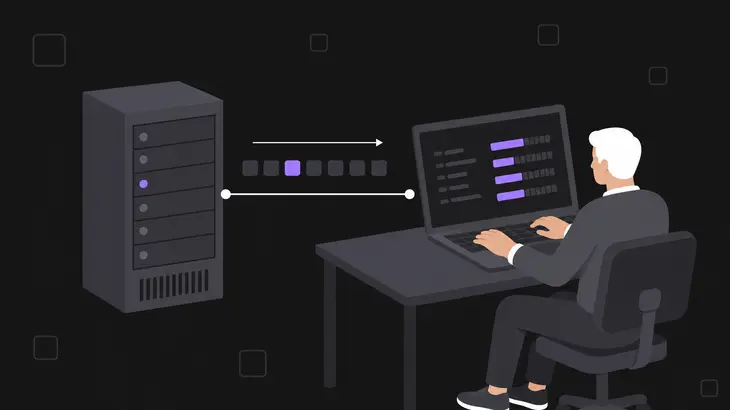
The server speaks first. On RFB 3.7 and later it sends a count, then that many single-byte type numbers, and the viewer answers with one byte naming the type it wants. Nothing else has happened yet: no password, no user name, no certificate. The security handshake is a list and a pick, and it is where the connection dies.
The viewer does not choose its favourite. It walks the server's list in order and takes the first entry it also supports, so the server's ordering sets the priority and the viewer's preference never enters into it. When it reaches the end of the list with nothing matched, it logs No matching security types and closes.
RFB 3.3 works differently and still turns up on old embedded viewers and vendor consoles. There the server sends one 4-byte number and the viewer gets no say, and the viewer accepts only 1 (None) or 2 (VncAuth). Anything else makes it throw Unknown 3.3 security type. The rest of that exchange, banner through first frame, is worth one read if you have not had it.
Why the type names in your config are not the numbers on the wire
Two implementations can both be correct and still share nothing above type 2, and that is why pairings break. RFC 6143 assigns three security types and stops there: 0 Invalid, 1 None, 2 VNC Authentication. Every other number you will read in a log comes out of the IANA RFB registry, where almost every entry is one vendor's and marked "historic assignment".
| Number | Name in the registry | Note |
|---|---|---|
| 0, 1, 2 | Invalid, None, VNC Authentication | The three RFC 6143 defines |
| 3-15, 128, 129, 130-134, 192 | RealVNC | Five separate historic blocks, RA2 and RA2_256 among them |
| 16, 17 | Tight, Ultra | Historic |
| 18, 19 | TLS, VeNCrypt | Historic, and two different numbers |
| 20, 21, 22 | GTK-VNC SASL, MD5 hash authentication, Colin Dean xvp | Historic |
| 23, 24 | Secure Tunnel, Integrated SSH | RFC 7869 |
| 30-36 | Apple Inc. | TigerVNC’s DH is 30 |
| 37-127 | Unassigned | MSLogonII sits on 113 anyway |
TigerVNC adds a second layer on top of that. Plain, TLSNone, TLSVnc, TLSPlain, X509None, X509Vnc and X509Plain are not wire types at all. They are VeNCrypt subtypes, numbered 256 to 262 inside the code, and the server collapses every one of them into a single advertised type 19. A server started with -SecurityTypes TLSVnc,VncAuth therefore puts two bytes on the wire, 19 and 2, and the subtype is negotiated inside VeNCrypt after the viewer has already committed.
So a viewer that does not speak VeNCrypt never sees the word TLSVnc, only a 19 it has to skip. And reordering your config string will not demote it, because the server emits VeNCrypt ahead of any plain type: -SecurityTypes VncAuth,TLSVnc still advertises 19 first, and every viewer that speaks VeNCrypt takes it.
Read what the viewer was offered and what it picked

Start from the viewer, because it sees both lists. It already prints its own decision at the default log level of 30, and the server's offer sits one level up at 100. Raise that one writer and leave the rest alone:
xtigervncviewer -Log '*:stderr:30,CConnection:stderr:100' <server-host>:1Quote the pattern, or a shell with a matching filename in the working directory expands it. CConnection names the viewer's connection log writer, so get it wrong and you see No logwriter found! and no extra output. On Debian and Ubuntu the binary is xtigervncviewer, with vncviewer as an update-alternatives link to the same file.
A successful handshake gives you one line per offered type, then the pick:
 CConnection: Server offers security type VeNCrypt(19)
 CConnection: Server offers security type VncAuth(2)
 CConnection: Choosing security type VncAuth(2)
A failed one gives you the offers and an error instead of a pick:
 CConnection: Server offers security type VeNCrypt(19)
 CConnection: No matching security types
The offers are what the server has. A missing Choosing line means the viewer implements none of them. Write the offered numbers down, because the next step compares against them.
Read what the server offered and what the client asked for
Client requests security type is logged at level 30, so it is already in the server's log with no extra flags. On Debian 13 the tigervncserver wrapper writes to ~/.config/tigervnc/<host>:<display#>.log, named after hostname -f:
grep 'security type' ~/.config/tigervnc/$(hostname -f):1.logOne Client requests security type line comes back per connection attempt. Nothing at all means the viewer never got that far, so check the path first: the Debian wrapper names the file after the fully qualified name, and on a machine with a domain set $(hostname):1.log is a different file that does not exist. Shipped TigerVNC 1.15.0 also prints the number with no space before the parenthesis, so a grep 'type VncAuth (' finds nothing even when the line is there. Match on the words, not the spacing.
Four server-side lines cover everything that goes wrong at this stage:
| Server line | What happened | What to do |
|---|---|---|
Client requests security type VncAuth(2) |
Negotiation succeeded and authentication starts next. A failure after this line is a password or certificate problem, not a negotiation one | Stop here and read the lines that follow it |
No supported security types |
The server’s enabled list came out empty, so every name in -SecurityTypes was rejected |
Fix the spelling of the type names |
No supported security type for 3.3 client |
A legacy viewer connected and the list holds neither None nor VncAuth |
Append VncAuth to the list for that viewer |
Requested security type not available |
The viewer picked a number the server never advertised | Treat the viewer as broken or proxied, because the offer and the pick disagree |
When you start Xtigervnc in the foreground instead of through the wrapper, its logging goes to stderr, so redirect with 2> and not >. A plain > captures stdout and leaves you with an empty file:
Xtigervnc :1 -SecurityTypes TLSVnc,VncAuth -Log '*:stderr:100' 2> /tmp/xtigervnc.logThat command holds the terminal. Run the viewer from a second terminal, then come back and read the file.
Change the list on the server, or change the viewer

Pick by who you control. A phone app, a vendor console or an appliance you cannot upgrade leaves one option, which is to grow the server's list. A desktop you own gets upgraded instead, because widening a server list for one stale client lowers the floor for everyone else who connects to it.
To grow the server's list, set the types explicitly, and set them on the program you are actually starting. The Xtigervnc binary defaults to TLSVnc,VncAuth, while the Debian tigervncserver wrapper that most people run defaults to VncAuth alone, or to VncAuth,TLSVnc when -localhost no is given. Restart on the display you are fixing:
tigervncserver -kill :1
tigervncserver :1 -SecurityTypes VncAuth,TLSVnc
Then reconnect with the viewer trace from earlier and read the Server offers security type lines, because those are the only honest account of what the server took.
Two traps live in that one option.
Unknown names are dropped in silence. Xtigervnc keeps the names it recognises and discards the rest with no warning, so -SecurityTypes TLS,VncAuth reaches the wire as VncAuth alone, and -SecurityTypes TLS reaches it empty and fails every connection with No supported security types. There is no type called TLS, only TLSNone, TLSVnc and TLSPlain, and that near miss is the one people type. Confirm from the offers rather than from the command you ran.
The sec-types list also moves the listening address. The wrapper binds to localhost only while the list holds no TLS* or X509* type, or holds at least one *None type, so adding TLSVnc to a stock configuration puts the server on every address of the machine. Check the bind after every change to the list:
ss -tln '( sport = :5901 )'Display :1 is port 5901. A local-only server answers with 127.0.0.1:5901 and [::1]:5901; a wildcard address there means the whole network can reach it now. Add -localhost yes to the start line when the way in is an SSH tunnel.
To change the viewer instead, check the build before you write a pairing off, because the manual lags the binary it documents. Debian 13's xtigervncviewer(1) ends its list of valid types at RA2ne_256, while the 1.15.0 binary alongside it also enables DH (type 30, Apple's range) and MSLogonII (type 113) by default. A viewer that already handles type 30 or 113 proves it in its own Choosing security type line, so run the trace before you go shopping for another client.
Ubuntu 24.04 and other builds
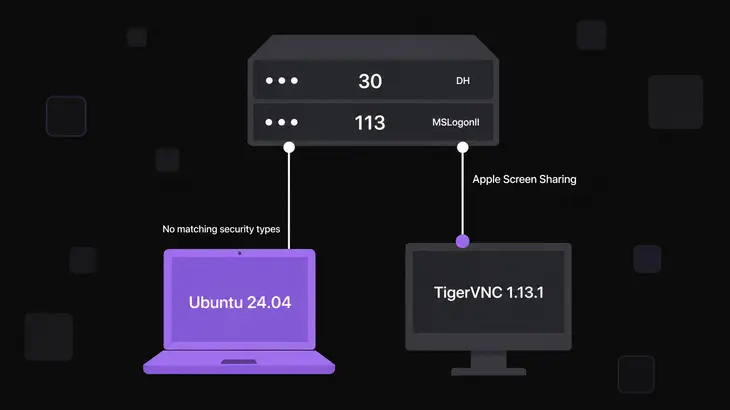
Ubuntu 24.04 ships TigerVNC 1.13.1, and two things move. The wrapper writes its log to ~/.vnc/ rather than ~/.config/tigervnc/. The viewer's default type list carries neither DH nor MSLogonII, so a server offering type 30 or 113 that a Debian 13 viewer handles fails here with No matching security types. Apple Screen Sharing is the one you are most likely to meet on 30. Log strings and -Log syntax are unchanged, so every command above runs as written.
When neither end is TigerVNC, install its viewer anyway and point it at the server for one run. The trace shows the offered numbers whatever wrote them, because they come off the wire rather than out of either side's vocabulary, and a number is something you can look up. Which implementations support which types is a table of its own, and so is what each type is worth once it connects.
The offers in the viewer's log settle which problem you have. A Choosing security type line, followed by a failure, points at authentication, and the answer is further down the same log. A list with nothing in common is a decision about who you control: grow the server's types for a client you cannot replace, or upgrade the viewer for one you can.
Either way, restart the server and read the Server offers security type lines before you connect. They show what actually survived the parser, and after a TLS* or X509* addition they are your cue to check the listening address in the same pass.
FAQs
Will adding a security type change what my existing viewers use?
Yes, and putting the new type last in the string will not stop it. The viewer takes the first entry in the server's order that it also supports, and any VeNCrypt subtype is hoisted to the front of the advertised list wherever it sits in your config. Adding TLSVnc to a VncAuth server moves every VeNCrypt-capable viewer onto VeNCrypt at its next connection. Types numbered below 256, such as RA2, do keep the order you give them.
Can one server serve an RFB 3.3 viewer without dropping TLS for everyone else?
Yes, because the 3.3 path is separate. The server scans its enabled list for None or VncAuth and sends that one type to the 3.3 viewer, while 3.7 and later viewers still get the full list and negotiate normally, so -SecurityTypes VncAuth,TLSVnc serves both. The list that fails is the one holding neither, and it fails with No supported security type for 3.3 client.
Discuss this in the community
Questions about this, or a setup it does not cover? Ask in Developer and Integration Topics.
Developer and Integration Topics group