Before you write a firewall rule for VNC, find out what the server is actually listening on. On a stock Debian or Ubuntu host, tigervncserver binds to loopback and nothing else, so a rule opening 5901 to the network guards a door that is not there. Run sudo ss -tlnp on the server and read the Local Address:Port column first.
Once you know the bind address, the job is two decisions: keep the listener on loopback, and scope the one service that carries remote viewers in, which is SSH.
How a viewer reaches a server, and what is listening by default
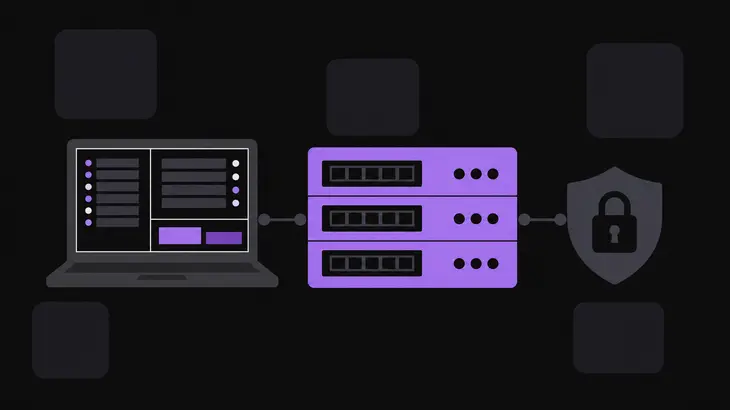
A VNC viewer opens a TCP connection, and the server accepts it on a listener, one socket held open on one port. IANA registers the rfb service on TCP port 5900, and each extra display adds one, so display :1 answers on 5901. The address that listener is bound to decides which hosts can reach it at all, and every rule you write afterwards depends on it.
On a stock Debian or Ubuntu host it is loopback. The default security-type list for tigervncserver is VncAuth alone, and the wrapper listens on localhost only while that list holds no TLS* or X509* type. A rule opening 5901 to the network on such a host protects nothing, because the listener is not reachable from the network in the first place. The moment someone adds TLSVnc to the list, the bind flips to every address on the machine, and the rule starts to matter.
Three things decide who gets in, in this order:
- The listener's bind address, set by the security-type list or by
-localhoston the start command. - The host firewall, the gate in front of that listener. Windows takes a rule per port or per program, macOS a setting per app, Linux a packet filter you read and write with
ufw,iptablesornft. - The SSH service, once you route viewers through a tunnel rather than exposing the listener. SSH becomes the one door, and the addresses your firewall admits for it are the addresses that can start a VNC session.
Routing viewers through SSH is the option worth taking on a multi-user host: one firewall rule instead of one per display, and the authentication problem moves onto SSH keys. Whether a VNC listener is safe to expose directly is a separate argument with its own answer.
Read what is listening and what the current rules allow
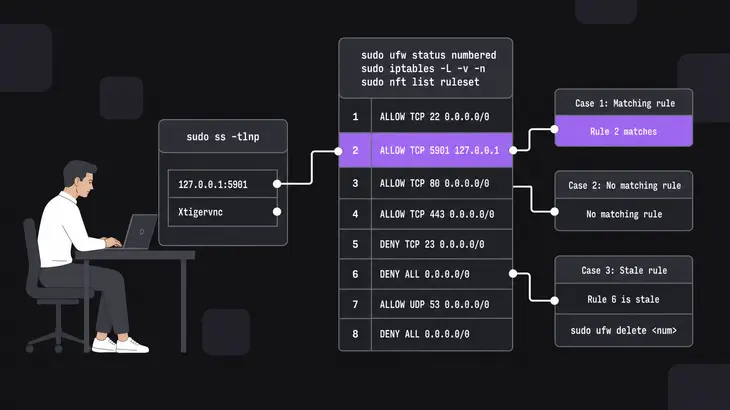
Start on the server, with the sockets rather than the rules. ss omits listening sockets unless you add -l; -n keeps the numbers raw instead of resolving them to service names, and -p names the process holding each socket.
sudo ss -tlnpRead the Local Address:Port column. A VNC listener shows as 127.0.0.1:5901 on loopback, or as 0.0.0.0:5901 and [::]:5901 when it is open to the network, and the Process column names Xtigervnc so you can tell your socket from everything else on the box. Map the port back by subtracting 5900: 5901 is display :1. A port that breaks that arithmetic came from -rfbport on the start command, which sets the listener port directly.
Then the rules. On Debian and Ubuntu the readable view is ufw, and the numbered form is the one to use because it gives you the handle for deleting anything stale:
sudo ufw status numberedThe packet filter underneath answers too. iptables -L suppresses the rule detail until you add -v, and -n stops it doing a reverse lookup on every address:
sudo iptables -L -v -n
sudo nft list ruleset
Both print the same ruleset. nftables has been Debian's default framework since Debian 10, and iptables runs through a compatibility layer on top of it, so a rule added either way lands in the same place.
What you find falls into three cases:
- A rule for the port your listener is actually on. Its target decides what reaches that listener.
- No matching rule. The chain's default policy decides, and on a fresh Ubuntu install that policy is never consulted at all, because ufw is still off.
- A rule for a port nothing listens on. Left over from an older display number. It matches nothing and protects nothing, so take its number from the listing and delete it with
sudo ufw delete <num>rather than leave the next person reading the ruleset to work that out.
Pin the listener to loopback with -localhost yes

Set it on the start command rather than relying on the default, because the default moves when the security types move. On Debian and Ubuntu that command is tigervncserver, -localhost yes keeps the listener on localhost whatever else it carries, and the display goes first:
tigervncserver :1 -localhost yesCheck it landed:
sudo ss -tlnp | grep 5901127.0.0.1:5901 means only processes on the server itself reach the listener, and a viewer on another host now has to come through the tunnel. Anything else on that line, 0.0.0.0:5901 in particular, means the start command lost the option somewhere.
The flip runs both ways, which is the part people get bitten by. Put a TLS* or X509* type in the list with no *None type alongside it, and the server listens on every address instead; the default list grows from VncAuth to VncAuth,TLSVnc to match. Adding TLS to harden the server widens its exposure in the same move, so pin -localhost yes explicitly if you want both.
Scope the SSH service, since it is the only way in
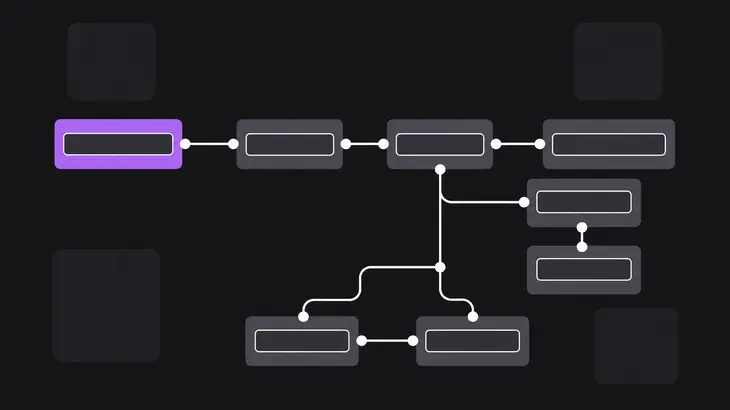
With the listener on loopback, every remote viewer arrives through SSH, so the SSH rule is the rule that matters. ufw arrives disabled, with a default incoming policy of deny. Two things follow: nothing is being filtered yet, and the moment you turn it on, anything you did not allow is gone, including the session you are typing in.
Allow SSH first, then enable. Replace <admin-subnet> with the range your administrators come from:
sudo ufw allow proto tcp from <admin-subnet> to any port 22
sudo ufw enable
ufw prompts before enabling while you are on an SSH session, which is your last chance to notice a missing allow rule. Ubuntu's openssh-server package also ships a ufw application profile, so you can name the service instead of the port:
sudo ufw app list
sudo ufw allow from <admin-subnet> to any app OpenSSH
sudo ufw app info OpenSSH prints what that profile covers, which is 22/tcp. Confirm the result:
sudo ufw status verboseWhat you want is an SSH line scoped to your subnet and no line for 5901 at all. A leftover VNC allow rule from an earlier attempt does nothing once the listener is on loopback, but it tells the next reader the port is meant to be open, so delete it.
On a firewalld host, which means RHEL and its rebuilds, the same three steps run against the default zone:
sudo firewall-cmd --add-service=ssh
sudo firewall-cmd --runtime-to-permanent
sudo firewall-cmd --list-all
--add-service writes a runtime rule only, --runtime-to-permanent is what carries it into the permanent configuration, and --list-all prints that zone's services and ports together.
Forward a local port and point the viewer at it

ssh -L forwards a local port over the secure channel to a host and port on the server's side. With localhost at both ends, a connection runs from the viewer into the local port, through SSH, and out to the server's own loopback, which is exactly where the listener now sits.
-N keeps ssh from running a remote command, so you get a tunnel and no shell. It holds the terminal either way, so the viewer goes in a second one:
ssh -N -L localhost:5901:localhost:5901 <user>@<server-host>From the second terminal, with the Debian and Ubuntu viewer binary:
xtigervncviewer localhost::5901The double colon takes a TCP port and a single colon takes a display number, so localhost::5901 dials port 5901 rather than display 5901. Confirm your own end is private with ss -tlnp on the viewer's machine: the forwarded port should read 127.0.0.1:5901, not 0.0.0.0:5901.
That bind address is the one thing the tunnel does not decide for you. Add -g to the ssh command and the forwarded port takes connections from remote hosts, which gives anyone on the viewer's network a route to the server's VNC listener without an SSH credential, which is the exposure the loopback bind just removed. Leave it off unless you mean it. Keys, autossh and the rest of the tunnel setup is its own job.
On Windows, read the rules you already have before adding one
A Windows VNC host is rarely a blank firewall. Installers write rules of their own: the UltraVNC installer adds an inbound allow rule for the server program with no port, no profile and no remote-address limit, plus the UDP twin. That permits winvnc.exe inbound on any port, on every profile including Public, from any address.
The other thing already there may be a block. When someone dismisses or cancels the Windows Security Alert, block rules are created, one for TCP and one for UDP, and an explicit block takes precedence over any conflicting allow. An allow rule added afterwards does nothing at all until that block is deleted, which is the usual answer to a rule that is present and still times out. Look from an elevated prompt:
netsh advfirewall firewall show rule name=all
netsh advfirewall firewall show rule name="UltraVNC Server TCP" verbose
Narrow what you find instead of stacking another rule on top of it. Delete the broad one, then add a replacement scoped to the port and the source range:
netsh advfirewall firewall delete rule name="UltraVNC Server TCP"
netsh advfirewall firewall add rule name="<rule-name>" protocol=TCP dir=in localport=5901 remoteip=<admin-subnet> action=allow
One more Windows detail catches the tunnel out. A forwarded connection reaches the server as a connection from localhost, and UltraVNC refuses localhost by default with AllowLoopback=0, so the tunnel that works everywhere else gets the door shut on it. The UltraVNC equivalent of -localhost yes is LoopbackOnly=1 in UltraVNC.ini: the server then accepts local connections only, and that setting overrides AllowLoopback. Set it and the broad installer rule stops mattering, though it is still worth deleting.
On macOS, the firewall allows per app, not per port
macOS 13 and later gives you no port field in the firewall pane. Incoming access is granted to an app or a service, and the VNC server you run gets its own entry.
- Open System Settings, click Network in the sidebar, then click Firewall.
- Click Options, where each app and service with an entry is listed.
- Set the entry for your VNC server to block incoming connections, and let SSH carry viewers in instead.
Because the entry covers the program rather than a port, changing the display number changes nothing here, and blocking the entry blocks every port that program listens on. The pane offers no source-address field either, so a Mac that has to admit one subnet and refuse the rest goes behind a network firewall or a tunnel.
Treat SSH as the one door for remote viewers and keep the VNC listener on loopback behind it. That turns a per-display firewall problem into a single scoped rule on port 22, and it survives someone adding a display next week.
The habit worth keeping is reading the bind address rather than trusting it. Run sudo ss -tlnp after every restart of the VNC server and after any change to the security types, because both can move the listener off loopback without a word. 127.0.0.1:5901 in the Local Address:Port column means the tunnel is still the only way in.
FAQs
I opened port 5901 and still cannot connect. What did I miss?
Most often nothing is listening on an address the rule can reach. On a stock Debian or Ubuntu host, tigervncserver binds to loopback while its security-type list holds only VncAuth, so the allow rule matches traffic that the server would refuse anyway. Run sudo ss -tlnp on the server: if the VNC line reads 127.0.0.1:5901, the firewall was never the problem, and the connection needs an SSH tunnel rather than an open port. On Windows the usual cause is different: a dismissed firewall prompt leaves block rules in place, and an explicit block beats any allow rule you add later.
How do I get VNC through Windows Defender Firewall, and how do I list the rule afterward?
An inbound allow rule for the port your server listens on, scoped to the addresses you trust, and netsh advfirewall lists what is active afterward. From an elevated prompt, this prints every active rule, including the ones an installer added:
netsh advfirewall firewall show rule name=allTo read one rule in full, pass the name and add verbose:
netsh advfirewall firewall show rule name="<rule-name>" verboseWhich port do I open for display :2?
- Each display adds one to 5900, so
:1is 5901 and:2is 5902, unless the start command carries-rfbport, which sets the port directly and breaks the arithmetic. Read it off the server withsudo ss -tlnprather than working it out, because a display started by someone else may not follow the convention.
Do I need a firewall rule at all if everything goes through an SSH tunnel?
Yes, on port 22. The tunnel moves the exposure rather than removing it: whoever can reach the SSH service can start a VNC session, so that is the service to scope. sudo ufw allow proto tcp from <admin-subnet> to any port 22 before sudo ufw enable keeps the rule tight and keeps you logged in while you turn the firewall on.
Discuss this in the community
Questions about this, or a setup it does not cover? Ask in Security and Remote Access.
Security and Remote Access group