VNC listens on TCP 5900 for display :0 and on 5900 plus the display number for everything else, so a desktop on :1 is on 5901 and :2 is on 5902. Only 5900 is registered with IANA for RFB, the protocol VNC speaks. You'll also run into 5800 and 5500, the web-viewer and reverse-connection ports on servers and viewers that still offer them.
Treat the offset as a starting guess. TigerVNC's Xvnc puts its listener wherever -rfbport <port> tells it, and -rfbport -1 switches TCP listening off altogether. Before you write a firewall rule or blame the network, look at what your server actually has open.
Which port goes with which display
Each desktop the server exports gets its own TCP listener, and server N listens on 5900+N the same way X servers sit on 6000+N. With one virtual desktop on :1, 5901 is the port you open and the one you dial.
| Port | What listens there | Notes |
|---|---|---|
| 5900/tcp | Display :0 |
The registered RFB port. RealVNC Server, TightVNC for Windows and macOS Screen Sharing all default to it. Red Hat numbers the console user :0, but a stock RHEL 9 install has nothing listening on 5900. A viewer pointed at :0 is refused until you turn on GNOME Screen Sharing, which shares the console session over VNC on 5900. |
| 5901/tcp | Display :1 |
Where Xvnc lands for :1 when nothing overrides the port. |
| 5902/tcp | Display :2 |
Where RHEL starts its first VNC user, as :2=<user> in vncserver.users. |
| 5900+N/tcp | Display :N |
Same rule, any display number. |
| 5800/tcp | Web listener that serves a Java viewer | Historical, and TightVNC for Windows still has it as a separate Web access port. It doesn’t speak RFB, so a VNC viewer gets nothing there. |
| 5500/tcp | A viewer waiting for a reverse connection | What vncviewer -listen waits on unless you give it a port. The server dials out to you. |
Your viewer takes either form. A single colon means a display number and a double colon a raw TCP port, so with a desktop on :1 these two lines reach the same listener:
vncviewer <server-host>:1
vncviewer <server-host>::5901
Reach for the double colon whenever the port and the display have parted ways, for example after an -rfbport change.
Check which port your server is really on
The display number tells you where the port should be; the kernel tells you where it is. On a Linux server, ss -tlnp lists the listening TCP sockets with the process that owns each one:
sudo ss -tlnp | grep -i vncXvnc (Xtigervnc on Debian and Ubuntu) on 0.0.0.0:5901 or [::]:5901 takes connections from anywhere your firewall lets through, because Xvnc listens on all interfaces unless told otherwise. 127.0.0.1:5901 is the one that trips people up: the server runs with -localhost, or with a localhost line in its config file, and nothing but an SSH tunnel will reach it. On Debian and Ubuntu that's where a fresh session lands: the tigervncserver wrapper stays on localhost until you set an encrypting security type. If grep comes back empty, no VNC process is listening on TCP at all: the server is stopped, or it runs with -rfbport -1.
Mac and Windows
With Screen Sharing on, a Mac listens on TCP 5900 by default. It has no ss, but lsof can filter by TCP state and puts the process name in its COMMAND column:
sudo lsof -nP -iTCP:5900 -sTCP:LISTENOn the viewer side, the Screen Sharing app keeps a port per saved connection. Choose Window > Connections, click All Connections, then the info button next to the connection and read its Port field. Leave it at 5900 when the far end is another Mac, and change it only when you're connecting to a VNC server on another port. The display offset only comes into play when the far end exports more than one display: Apple Remote Desktop reaches a VNC server's second and third displays on 5901 and 5902, counting the primary display as 0.
In PowerShell, Get-NetTCPConnection does the job of ss and gives you a row per listener with its local address and port:
Get-NetTCPConnection -State Listen -LocalPort 5900No line back from lsof or Get-NetTCPConnection means nothing holds 5900: the server is stopped or has moved to another port.
Move a listener to another port
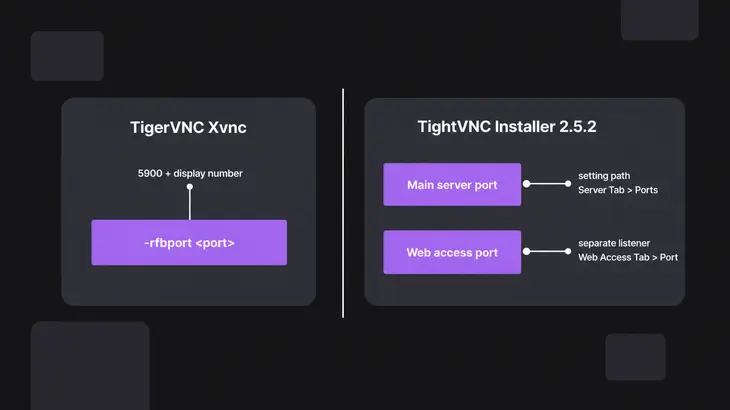
TigerVNC on RHEL 9
The easy move is a new display number: the port follows it, and up to :3 you stay inside the firewalld vnc-server service. A line :3=<user> in /etc/tigervnc/vncserver.users puts that user on display :3, which is TCP 5903. Start the matching unit and check that 5903 shows up in ss:
sudo systemctl enable --now vncserver@:3
sudo ss -tlnp | grep 5903
When the port mustn't follow the display, set it outright. In a session vncsession starts, Xvnc options go in the user's config file one per line, so -rfbport becomes rfbport=<port>. From TigerVNC 1.14 that file is ~/.config/tigervnc/config; older releases read ~/.vnc/config. Append the line as the session user, then restart as root and look for 5910:
echo 'rfbport=5910' >> ~/.config/tigervnc/config
sudo systemctl restart vncserver@:2
sudo ss -tlnp | grep 5910
From now on the viewer needs the port form, vncviewer <server-host>::5910. And 5910 sits outside the vnc-server firewalld service, which stops at 5903, so open it with --add-port=5910/tcp (see the firewall section below).
TightVNC for Windows
The Main server port (default 5900) sits under Server > Incoming Viewer Connections, and the Web access port (default 5800) under Server > Web Access. Changing the Web access port does nothing for VNC viewers; they always connect to the Main server port. tvnserver.exe -controlservice opens the configuration window of the service-mode server. To set the port at install time, put the SET_RFBPORT and VALUE_OF_RFBPORT properties on the msiexec line. They only touch the service-mode server:
msiexec /i <tightvnc-msi> /quiet /norestart SET_RFBPORT=1 VALUE_OF_RFBPORT=5910RealVNC Server on Linux
Here the port is the RfbPort parameter, 5900 unless you change it, and changing it needs an Enterprise subscription. For Service Mode it goes in /root/.vnc/config.d/vncserver-x11, one Name=Value per line. Then restart the service and check that 5910 is now the one listening:
echo 'RfbPort=5910' | sudo tee -a /root/.vnc/config.d/vncserver-x11
sudo systemctl restart vncserver-x11-serviced
sudo ss -tlnp | grep 5910
Open the port, or tunnel it instead
For anything that crosses the internet or a network you don't run, keep the VNC port closed and carry the session inside SSH. Open the port directly only on a LAN you trust.
The vnc-server firewalld service opens TCP 5900 to 5903, which covers displays :0 to :3. Anything higher needs its own --add-port rule, and the reload makes both live. Each command answers success:
sudo firewall-cmd --permanent --add-service=vnc-server
sudo firewall-cmd --permanent --add-port=5904/tcp
sudo firewall-cmd --reload
Ubuntu's ufw takes the port and the source network you trust in one rule:
sudo ufw allow proto tcp from <subnet> to any port 5901On a stock Ubuntu install ufw is disabled, so that rule does nothing until you enable the firewall, and nothing was blocking 5901 before it. Enabling ufw flushes its chains and can drop the SSH session you're typing in, so allow SSH first and check the result:
sudo ufw allow 22/tcp
sudo ufw enable
sudo ufw status
For the tunnel, ssh -L listens on a port on your machine and makes the onward connection from the server's side, so localhost in the forward means the server itself. That's why it also reaches a listener bound to 127.0.0.1:
ssh -N -L 5901:localhost:5901 <user>@<server-host>With -N, ssh runs no remote command and holds that terminal for as long as the tunnel is up. Leave it open and start the viewer from a second terminal:
vncviewer localhost:1Keep the local port and the viewer address in step: local 5901 is display :1 to the viewer. If 5901 is already taken on your machine, forward 5911 instead and connect to localhost::5911.
TigerVNC's viewer can build the same tunnel itself with -via. It resolves the host that follows on the gateway, so localhost there is the server:
vncviewer -via <user>@<server-host> localhost:1With a tunnel the VNC port needs no firewall rule at all. Only SSH has to be reachable, and SSH is the only port you'd forward on a NAT router.
When the viewer and the listener disagree
Each of these has the same root: your viewer dials one port and the server listens on another, or on another address.
- A viewer pointed at 5800 never gets a desktop. That port is a web listener for a Java viewer, not RFB. Dial the RFB port instead:
vncviewer <server-host>::5900, or 5900 plus the display number. <server-host>:1is refused while the server is running. Someone moved the listener with-rfbport. Runsudo ss -tlnp | grep -i vncon the server to find the real port, then connect withvncviewer <server-host>::<port>.- Xvnc is running but
ssshows no VNC listener. It runs with-rfbport -1, which turns TCP off. Drop the option or therfbport=-1line and restart the unit. - It works through SSH but other hosts are refused or time out. Either the listener sits on
127.0.0.1because of thelocalhostoption, or the firewall drops the port.sstells you which:127.0.0.1:5901is the option,0.0.0.0:5901points at the firewall. Open the port as above, or keep using the tunnel. - On RHEL, displays
:2and:3connect but:4and up time out. Thevnc-serverfirewalld service stops at 5903. Add the higher port with--add-port, as above.
Before you open any port, decide whether the path to the server crosses a network you don't run. If it does, forward only SSH and tunnel. If it doesn't, open exactly the port ss showed you, not a range.
FAQs
Does VNC use TCP or UDP on port 5900?
TCP. IANA lists 5900 for both TCP and UDP, but an RFB client connects to the server over TCP, so your firewall rules only need TCP.
Does moving VNC off 5900 make it safer?
Only against scanners that try the default port. An RFB server talks first: as soon as a client connects, it sends its ProtocolVersion, a 12-byte RFB xxx.yyy line, so a scan that connects to any port learns it's VNC. Ask your own listener from the server:
nc localhost 5910The version line, such as RFB 003.008, comes back before you've typed anything. Pick the port for convenience; the password, the localhost listener and the SSH tunnel are what keep people out.