The version number on your VNC server almost never matches the one an advisory names, and that gap produces most of the wrong answers. CVE-2026-34352 reached users as TigerVNC 1.16.2 upstream, as a Debian 13 package that still reads 1.15.0, and as seven more version strings, from 1.1.0 up to 1.15.0, across Red Hat's supported releases. Every one of those is patched, and none of them is 1.16.2.
So the tracker row your distribution keeps for the source package is the answer, and the upstream release page is not. Getting to that row takes three moves: find the package behind the process that is listening, read how your distribution has tracked that package, then look at what the listener is exposed to in the first place, which no record covers at all.
Three layers hold a VNC flaw, and only one of them gets a CVE number

The protocol layer is the RFB handshake and the security types it offers. Nothing patches it: VNC Authentication works the way it worked in 2011, and the only lever you have is which types your server lists.
The library and application layer is where the records live. LibVNCServer and LibVNCClient, TigerVNC, TightVNC and x11vnc all carry their own code, and a record names one of them at one range of versions. Programs that merely embed VNC code land here too, which is why a media player turns up in VNC advisories.
The configuration layer is the address your listener binds to and the types it actually offers. No CVE number covers it, no patch changes it, and on a host that only ever accepts tunnelled connections it decides more about exposure than any of the records do.
A single host usually sits inside one range and outside another, because the layers move independently. Work through them in that order and the answer is a short list rather than a feeling.
Find the process, then the package behind it
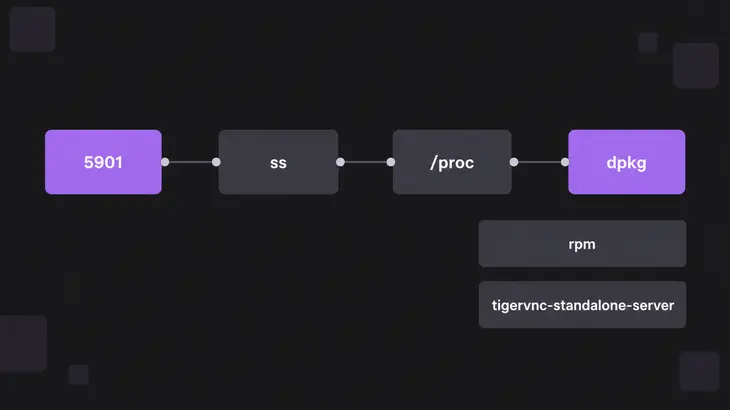
Start with what is listening, on Debian 13 and on any other systemd distribution:
sudo ss -lntp | grep -E ':59[0-9][0-9]'ss prints the bind address in front of the port, and that address is the exposure in one field: 127.0.0.1:5901 is reachable only from the host itself, while 0.0.0.0:5901 is reachable from anywhere that can route to it. Port 5901 means display :1, because the RFB port is 5900 plus the display number. The users: field at the end of the line carries the process name and its PID. Without sudo the process column stays empty for anything you do not own.
Take that PID through /proc to a real path, then to a package:
sudo readlink -f /proc/<pid>/exe
dpkg -S /usr/bin/Xtigervnc
dpkg-query -W -f='${Package} ${Version}\n' tigervnc-standalone-server
The last line prints something like tigervnc-standalone-server 1.15.0+dfsg-2.1~deb13u1. Going through /proc rather than guessing a binary name matters, because the names are repackaged: the standalone server package installs Xtigervnc, tigervncserver and tigervncserver@.service, while the same role on Fedora 43 arrives as vncserver, x0vncserver and vncserver@.service.
On RPM distributions the same two steps are:
sudo readlink -f /proc/<pid>/exe
rpm -qf /usr/bin/x0vncserver
rpm -q tigervnc-server
which prints tigervnc-server-1.15.0-7.fc43.x86_64 on Fedora 43. The -7.fc43 on the end is the distribution's own release number, and +dfsg-2.1~deb13u1 does the same job on the Debian side. That suffix is where a backported fix shows up, and it is the part people throw away when they report "we are on 1.15.0".
One upstream fix, a different answer from every distribution

CVE-2026-34352 is a permissions defect in x0vncserver, where other local users can observe or manipulate the screen contents. Upstream shipped it twice: 1.16.1 was the security release that shipped without the security fix, and 1.16.2 was the second attempt a day later. Then every distribution answered differently.
| Platform | Status for CVE-2026-34352 | Version carrying the fix |
|---|---|---|
| Debian 13 trixie | fixed | 1.15.0+dfsg-2.1~deb13u1 |
| Debian 12 bookworm | vulnerable, marked no-dsa as a minor issue | none; the package stays at 1.12.0+dfsg-8 |
| Ubuntu 24.04 LTS and every other supported release | Needs evaluation | none published |
| RHEL 9 | fixed by errata | tigervnc-1.15.0-6.el9_7.1 |
| Upstream | fixed | 1.16.2 |
The trixie package reads 1.15.0 and is patched, because the maintainer backported the fix instead of moving the version. Read your own copy of that changelog and the reasoning is right there on disk:
zcat /usr/share/doc/tigervnc-standalone-server/changelog.Debian.gz | grep -m3 CVE-On a patched Debian 13 host the first hit is CVE-2026-34352: Prevent other users reading x0vncserver screen. Every non-native package ships that file at a fixed path, so the check works for any package you are unsure about. The RPM equivalent reads the same information out of the package metadata:
rpm -q --changelog tigervnc-server | grep -m3 CVE-A changelog entry is the maintainer's note rather than the record, so treat it as confirmation and treat the tracker row as the answer. And an upgrade swaps the files on disk without touching a running process, so restart the server afterwards or the old binary keeps serving.
A row reading Needs evaluation means there is nothing to install yet, which is the position Ubuntu hosts are in for this record. That throws the decision back onto the defect itself: this one needs a local account on the same machine, so a single-admin box can wait, while a shared login host is better off not running x0vncserver at all until a package lands. Watch the row rather than the upstream release page, because the row is what will change.
The library layer, where upstream has no fix to offer
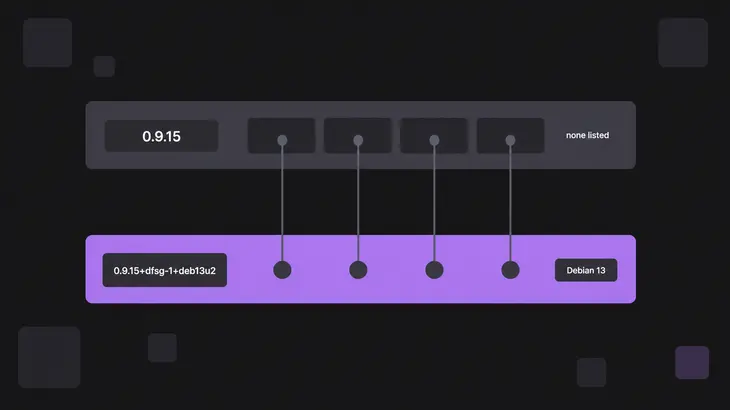
LibVNC is where one flaw reaches every program that links it, and right now its open records have nowhere to upgrade to.
| Record | Component | Affected versions | Upstream fix |
|---|---|---|---|
| CVE-2026-50538 | LibVNCClient Tight decoder, high | 0.9.12 and later | none listed |
| CVE-2026-44988 | LibVNCClient Tight Gradient decoder, high | master, and 0.9.15 if the code is present | none known |
| CVE-2026-32854 | LibVNCServer HTTP proxy handlers, medium | 0.9.15 and earlier | none listed |
| CVE-2026-32853 | LibVNCClient UltraZip decoder, medium | 0.9.15 and earlier | none listed |
The newest LibVNCServer release is 0.9.15, from December 2024, so building the latest tarball fixes none of the four. Distribution packages are the only place a fix exists: Debian 13 carries all four as patches on top of the same 0.9.15 source, in 0.9.15+dfsg-1+deb13u2.
Three of the four only bite a viewer, and the prerequisite is the server you point it at, because the crafted framebuffer update comes from a malicious or man-in-the-middle server. A viewer that only ever reaches machines you run meets that condition far less often than one that dials arbitrary hosts, which makes the address you type the input that matters. The fourth needs the non-default -httpd and -enablehttpproxy options on the server side, so anything started without them sits outside it.
The trap is assuming one package covers it. Each of these records is tracked against six separate source packages, and they do not move together: libvncserver reads released, while x11vnc, tightvnc, veyon and vino all still read Needs evaluation. The reason is in how each one builds. x11vnc builds against the shared library, so it picks up a library fix as soon as the process restarts. The tightvnc source builds with no libvnc dependency at all and carries RFB code of its own from the 1.3.10 line, so a library update does nothing for it and it needs its own tracker row. One command separates the two cases:
ldd /usr/bin/x11vnc | grep -i vncA line naming libvncserver.so means the library update reaches that binary. No line means the program carries its own copy, and you check that program's own package.
The same logic puts non-servers in scope. CVE-2022-41325 is a buffer overflow in a media player's vnc module that fires when a vnc:// URL is played, it covers 3.0.17 and earlier, and it was closed in 3.0.18. Nothing about it is a VNC server problem, and a search for "VNC vulnerability" hands it to you anyway.
The configuration layer, which no record covers

Stock tigervncserver is quieter than its reputation. With no options passed, the default type list is VncAuth, and the wrapper listens on localhost only whenever that list holds no TLS* or X509* type and no *None type. So a default start is loopback only, and the ss line from earlier proves which state you are in: 127.0.0.1:5901 is the default, 0.0.0.0:5901 means someone changed it.
What changes it is passing -localhost no, or adding a TLS or X509 type to the list. Both are deliberate, and -localhost no also flips the default list to VncAuth,TLSVnc. Settings arrive from /etc/tigervnc/vncserver-config-defaults, then the per-user config, then the command line, and finally /etc/tigervnc/vncserver-config-mandatory, which overrides everything before it.
Knowing what VncAuth protects keeps the rest in proportion. The server sends a 16-byte challenge and the viewer returns it encrypted with DES, so the password never crosses the wire in clear. The key is built by truncating that password to eight characters, so anything you type past the eighth is decoration, and nothing after the handshake is protected at all. The remedy named in the specification is to carry the session inside IPsec or SSH, which is also what an unprotected session stream costs you in practice.
One more thing the type list does not do: force anything. The server offers a list and the viewer picks one entry from it, so a list that still contains VncAuth still allows VncAuth. Removing a type is the only way to stop it being chosen.
Platform notes worth having before you patch
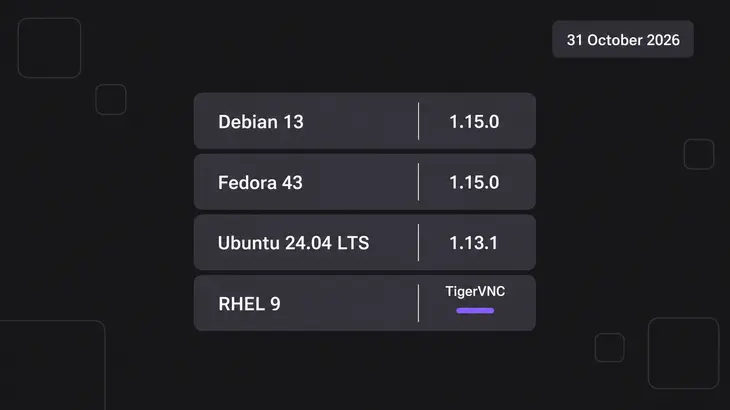
RHEL 9 users should know the destination before upgrading toward it: TigerVNC is deprecated and set for removal in a future major release, with gnome-connections continuing as a client but not as a server. That changes whether a long migration is worth starting.
No stable release currently ships the 1.16 line at all. Debian 13 and Fedora 43 both sit on 1.15.0, Ubuntu 24.04 LTS sits on 1.13.1, and only Debian's forky and sid have 1.16.2. "Upgrade to 1.16.2" therefore means leaving your distribution's packages behind, which is usually the wrong trade when the backport already exists.
Closed-source implementations have no tracker row to read, so the vendor's own list is the record. RealVNC keeps a published list of the issues that have affected its software, with the affected and fixed version for each.
Every state above was read on 31 October 2026. Tracker rows move, "Needs evaluation" becomes released or ignored, and new records land, so the rows themselves are the thing to keep, not this snapshot of them.
The version string your package manager prints is the start of the answer rather than the end of it. Match the process to a package, take that package to your distribution's tracker, and only then compare anything to an upstream release number.
The quickest way to find out how much of this applies to a host is to see how many candidates it even has:
dpkg-query -W -f='${Package} ${Version}\n' | grep -Ei 'vnc'Swap the first command for rpm -qa on the RPM side. Most machines come back with a viewer, a server and a library, each with its own tracker row and its own answer.
FAQs
Can a VNC server be reached without any credentials?
Yes, when the server's type list contains None, which the specification defines as needing no authentication. The viewer chooses from whatever the server offers, so one credential-free entry in the list is enough for a viewer to take it, whatever else sits alongside. Drop None from the list and that choice disappears.
Does upgrading to the newest upstream release make me safe?
Not reliably, and for LibVNC right now it does nothing at all: 0.9.15 is the newest release and all four open records cover it. Distribution packages run the other way, carrying fixes that upstream has not released yet, so an upgrade off your distribution usually loses protection rather than gaining it.
My scanner calls CVE-2026-34352 critical and my vendor calls it moderate. Which is right?
That record carries three published scores: 9.8 with a network vector from NVD, 8.5 with a local vector from the assigning authority, and a third rating of 6.3 Moderate from the enterprise distributor that ships the package. The defect is incorrect file permissions letting other users on the same machine see x0vncserver output, so triage it on the vector rather than the headline number, and let your own vendor's rating drive the ticket.
Which packages should I be checking, not just tigervnc?
Whatever your host actually runs. Besides tigervnc, the source packages that get their own tracker rows for a LibVNC record include libvncserver, tightvnc, x11vnc, veyon and vino, and any application shipping a viewer of its own gets a row too. The ldd check tells you which of them inherit a library fix and which need a fix of their own.
Discuss this in the community
Questions about this, or a setup it does not cover? Ask in Security and Remote Access.
Security and Remote Access group