No mainstream VNC server ships a default password you can look up. On Debian and Ubuntu the tigervncserver wrapper prompts you to create one the first time you start a display, and the Xtigervnc binary underneath reads no password file at all until you name one. Preset credentials do exist, but they belong to cameras, KVMs and vendor appliances rather than to VNC.
That makes the useful question on an inherited host a different one: does a password file exist, who can read it, which security type the server offers, and what the eight-character check behind the prompt actually covers.
There is no shipped VNC default password

Start at the binary. Xtigervnc reads its VNC password from a file you point it at, and the password file option carries no default value: there is none, and you name the file explicitly. Nothing authenticates anybody until you create it.
One layer up, Debian and Ubuntu install a tigervncserver wrapper that closes the gap by asking. Start a display with VncAuth among the security types and no password file on the command line, and the wrapper prompts for one and creates it before anything else happens. A first start on Debian 13 looks like this:
$ tigervncserver :1

You will require a password to access your desktops.

Password:
Verify:
Would you like to enter a view-only password (y/n)? n
A view-only password is not used
So the password on that host is whatever the person who ran that command typed. There's no value for you to recover and no manual holding one.
Where a genuine default password does exist, it belongs to a device rather than to a protocol: a camera, an IPMI console, a set-top box or a vendor appliance that shipped a VNC listener with a preset login, which is the weakness class catalogued as use of default credentials. That credential is the product's, and you clear it through the vendor's own setup procedure. Nothing in a VNC config file will touch it.
What the password is and where it lives
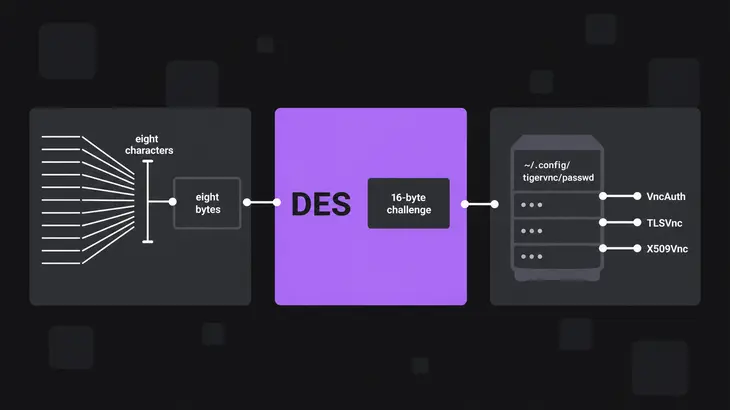
A VNC password isn't an account password and it doesn't belong to a user. It sits in one file on the server, eight bytes long, and the server hands it to viewers as the security type VncAuth. You'll find it at ~/.config/tigervnc/passwd on Debian 13, and your server only opens it for the VncAuth, TLSVnc and X509Vnc types, so if you have configured anything else it never gets read.
Eight bytes is all the scheme can use. VNC Authentication has the server send a random 16-byte challenge and the viewer return it encrypted with DES, and to build that key it truncates your password to eight characters or pads it with nulls on the right. Type a twenty-character passphrase and characters nine onward change nothing about who gets in.
Two things follow that matter more than how clever your password is. The stored form is reversible rather than hashed, with the unscrambling routine sitting in the same open source file as the scrambling one, so anyone who can read that file can read your password. And VncAuth covers the login only: the desktop stream after it carries no protection of its own, which is why the security type your server offers decides far more than the password does.
What "default password" means on TightVNC, UltraVNC and RealVNC

The phrase that sends people hunting comes from TightVNC's Win32 documentation, where a machine-wide password applies when no user-specific one is available. Even there it was never a preset value: no predefined default password has ever shipped, and "default" names the fallback's scope rather than a known string. That documentation also predates TightVNC 2.0 and carries its own warning to that effect, so the Administration -> Show Default Settings entry it walks you through belongs to builds older than anything you are likely to be running. TightVNC 4.0.0, released on 25 October 2026, moved password authentication to SRP-6a and dropped the eight-character ceiling.
UltraVNC takes the opposite line on a blank password. Its AuthRequired default of 1 makes the server refuse every incoming connection until the password field holds a non-null value, so a fresh install with nobody's password in it is closed rather than open.
RealVNC Server has no VNC password until something sets one, and on most installs VNC password authentication is not the scheme in play at all. Where it is, the password utility writes the value into vncserver-x11 under config.d, in /root/.vnc/ for a service-mode server and in the user's own ~/.vnc/ for user mode.
| Implementation | Out of the box | How a password gets there |
|---|---|---|
| TigerVNC on Debian 13 and Ubuntu 24.04 | No password file at all | The tigervncserver wrapper prompts on first start and runs tigervncpasswd |
| TightVNC 2.0 and later on Windows | No preset value; the machine-wide “default” dialog belongs to pre-2.0 builds | Set in the server properties; 4.0.0 uses SRP-6a instead |
| UltraVNC on Windows | AuthRequired=1, so connections are refused until a password exists |
The passwd entry in ultravnc.ini, written through the server properties |
| RealVNC Server | No VNC password, and often not using VNC password authentication | vncpasswd -service or vncpasswd -user |
Check what an inherited host actually has
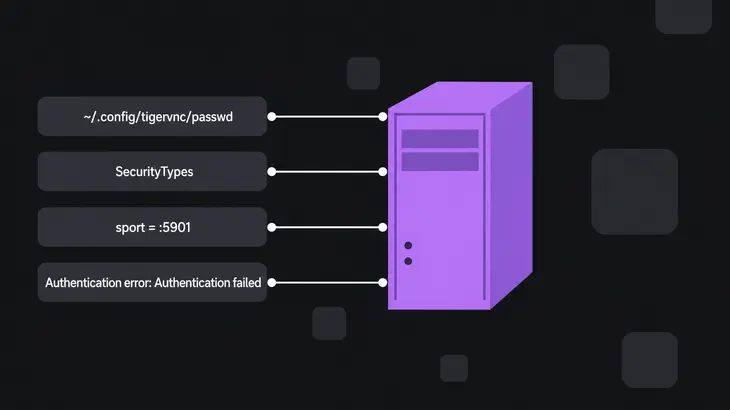
Four readings settle the state of a VNC server you have just been handed, and you run all four on the box itself. They are written for Debian 13 with tigervnc 1.15.0, on display :1 and port 5901. Ubuntu 24.04 moves two paths, listed after.
Start with the file. If it's missing, nobody has set a VNC password for that account, and the wrapper will ask for one the next time the display starts:
ls -l ~/.config/tigervnc/passwdA healthy answer is eight bytes owned by the session user with nothing set for group or world:
-rw------- 1 <user> <user> 8 Oct 14 09:12 /home/<user>/.config/tigervnc/passwdAnything looser stops the server rather than weakening it. The wrapper refuses to start and prints must NOT be accessible by others. Set permission to 0600!, worth recognising before you go hunting for a display that won't come up.
Next, what the server offers. With nothing configured, the wrapper offers VncAuth alone and binds to loopback, so the password is the whole door and only the host itself plus SSH forwards ever reach it. Three files can change that:
grep -rsn 'SecurityTypes|localhost'
  /etc/tigervnc/vncserver-config-defaults
  /etc/tigervnc/vncserver-config-mandatory
  ~/.config/tigervnc/config.pl
A security types line carrying any TLS or X509 type, with no None type alongside it, moves the listener onto every address on the machine. That is the one edit in those files that changes who can reach your password prompt at all.
Then where it's listening right now:
sudo ss -ltnp 'sport = :5901'Stock Debian 13 answers with two loopback rows, 127.0.0.1:5901 and [::1]:5901. A 0.0.0.0:5901 or *:5901 row means the box takes connections straight off the network, and the eight-character check is the only thing in front of the desktop.
Last, what the server has already seen. The per-display log sits beside the password file:
grep -E 'Authentication (error|failure|failed)' ~/.config/tigervnc/*:1.logA wrong password on 1.15.0 logs Authentication error: Authentication failed. A run of those from one address is somebody working through a list, not a colleague fat-fingering it.
Ubuntu 24.04 ships tigervnc 1.13.1 and keeps the same four readings, with the paths moved: the password file is ~/.vnc/passwd, the log is ~/.vnc/*:1.log, and the user config file is ~/.vnc/tigervnc.conf rather than a Perl file under ~/.config/tigervnc/. Its wrapper defaults to VncAuth the same way, and its log wording for a failed login differs, which is why the grep above matches three spellings.
Set, change or clear the password

tigervncpasswd is the whole job on both releases. Run it as the session user rather than root, because it writes into that user's own directory:
tigervncpasswdIt prompts twice, offers you a separate view-only password, and sets the file mode itself, so you never chmod it by hand.
Don't restart anything. Xtigervnc reads the password file on each authentication attempt rather than at startup, so the next viewer to knock meets the new password and the sessions already open carry on untouched.
Two limits bite while you are typing, and they differ by release. Under six characters the tool refuses with Password must be at least 6 characters - try again. Over eight, Debian 13's build refuses as well, printing Password should not be greater than 8 characters and prompting again. Its own man page still carries the older wording about the first eight characters counting, which that binary no longer matches. Ubuntu 24.04's 1.13.1 does keep the first eight and prints nothing, so a sixteen-character password there is quietly a different password from the one you think you set.
Prove it from a viewer before you walk away. A stock listener only answers on loopback, so your connection has to arrive through SSH, and -via builds that forward for you. The localhost in the address resolves on the gateway rather than on the machine you are sitting at:
xtigervncviewer -via <user>@<server-host> localhost:1The old password bouncing and the new one landing you on the desktop is the whole confirmation.
You can't set an empty VNC password, and you wouldn't want to. Deleting the file won't lock anyone out of a running server either: Debian 13 carries a local patch that keeps the last copy the server read, so an unreachable home directory can't strand a logged-in user, and a deleted file lands in the same case. Stop the display if you mean it:
tigervncserver -kill :1That takes the X session and everything running inside it, so pick your moment. The next start prompts for a new password. Moving the server off VncAuth is the real alternative, and which security type replaces it is the decision that matters more than the string you pick.
RealVNC Server does the same job through its own utility, with a mode flag for a service-mode or a user-mode server, and -print to emit the encoded form for a config file or a policy template:
sudo vncpasswd -serviceThe lockout that is already running
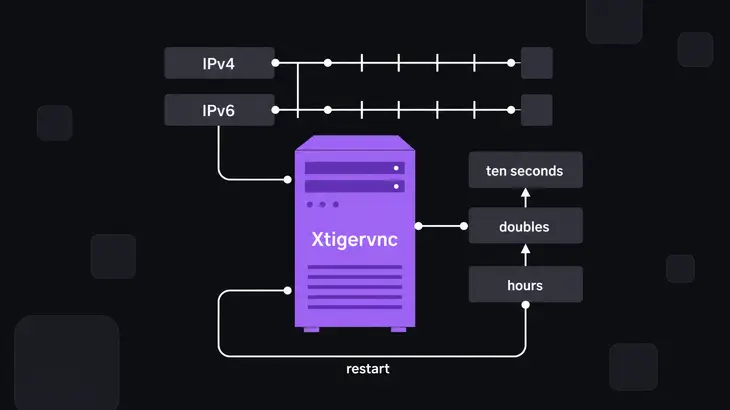
Nothing needs switching on to slow a password guesser down. Blacklisting runs by default in Xtigervnc, at five failed attempts from one address before that address is blocked, with a first timeout of ten seconds.
What happens after that is the part worth knowing. The timeout doubles on every repeat, so a patient attacker backs off into hours. The list lives in the running server process and nowhere else, though, so restart that display and every blocked address starts clean again. It also counts per address, which means the same host arriving over IPv4 and then over IPv6 gets two budgets. Don't mistake it for a lockout policy; it buys you time, nothing more.
Nothing on an inherited VNC host is waiting to be looked up, so the question worth settling first is whether its password matters on that box at all. A listener answering only on loopback keeps VncAuth behind SSH access you already manage, and eight characters is a fair second layer there. One answering on every address makes those same eight characters the entire front door, and your fix is the bind and the security type, not a longer password the scheme would throw away anyway.
Either way, set a fresh one with tigervncpasswd before you hand the box back. A password you did not choose is one you cannot reason about, and on a server somebody else configured you have no idea how many people already know it.
FAQs
I inherited a VNC server and nobody knows the password. Can I recover it?
Not in any way that helps, and not from a manual, because no value ever shipped with the software. Replace it instead: run tigervncpasswd as the session user that owns the display, and the next connection attempt uses the new one. Nothing needs restarting and nobody currently working in the session gets dropped, which makes this a safe thing to do in the middle of the afternoon.
Does the VNC password travel over the network in clear text?
No. The server sends a random challenge and the viewer returns a DES-encrypted response, so the password itself never crosses the wire. The weaknesses sit elsewhere: the key is only the first eight characters, and everything after the login runs unprotected unless a TLS or X509 security type is in play.
Does TightVNC 4.0.0 still authenticate with the traditional VNC password scheme?
No. Password authentication there moved to SRP-6a, which handles long passwords and international characters, so the eight-character ceiling of the traditional VNC password does not apply to it.
My VNC server will not start and the error mentions permissions on the password file. What happened?
The wrapper checks the file mode before it starts anything and exits when group or world has any access to it at all. Run chmod 600 on the file, or delete it and let the next start prompt for a replacement. tigervncpasswd sets the mode correctly by itself, so this almost always follows a file copied between hosts or pulled out of a backup.
Is a six to eight character VNC password enough on its own?
On a listener the network can reach, no. Eight characters, behind a backoff that starts at ten seconds and resets whenever the server restarts, will not hold up to sustained guessing. Treat it as the second layer and keep the listener on loopback behind SSH, which is the stock behaviour on both releases anyway.
Discuss this in the community
Questions about this, or a setup it does not cover? Ask in Security and Remote Access.
Security and Remote Access group