A TigerVNC viewer only checks a server certificate when the session negotiates one of the X509 security types. Once it does, the certificate has to chain to a certificate authority (CA) the viewer trusts and carry the name you typed in the viewer address. A certificate and a key sitting on the server change nothing by themselves, because only an X509 type ever offers them and the stock type list holds none.
When the check does run and fails, the viewer doesn't hang up. It shows you the certificate, names the problem and offers to add an exception, and an exception you accept is remembered for that host. So a CA file on every viewer buys you a prompt worth reading rather than a closed door, and a revoked certificate is the one answer nobody can click past.
How a viewer decides whether to trust a VNC server's certificate
A certificate check has four moving parts: the viewer, the server, the certificate the server presents and the CA certificate the viewer trusts. In the TLS step of the session the server presents its certificate, and GnuTLS on the viewer side walks the chain and compares the name. The viewer loads the system trust store and your own CA file together, so a certificate from a public CA for a public name needs no extra files, while one from your internal CA needs that CA's certificate on every viewer host.
Whether any check happens at all comes down to the security type the two ends settle on. TigerVNC takes thirteen of them: None, VncAuth, Plain, TLSNone, TLSVnc, TLSPlain, X509None, X509Vnc, X509Plain, RA2, RA2ne, RA2_256 and RA2ne_256. Only the three X509 types make the server present a certificate. The TLS types encrypt with an anonymous key exchange, so there is no certificate to check, and the RA2 family carries a raw key of its own rather than an X.509 chain.
A clean verification is silent: the session carries on and nothing appears. Every other result goes to the person sitting at the viewer. An unknown issuer, an expired or not-yet-valid certificate, a weak signature algorithm and a name the certificate doesn't list each raise a dialog with the certificate in it, asking whether you want to make an exception for this server. Accept it and that certificate lands in the known hosts database at ~/.local/state/tigervnc/x509_known_hosts, trusted for that host from then on. Revocation is the one result with no button to press, and the connection ends there.
Anonymous TLS leaves VNC TLS certificate validation with no server identity to check
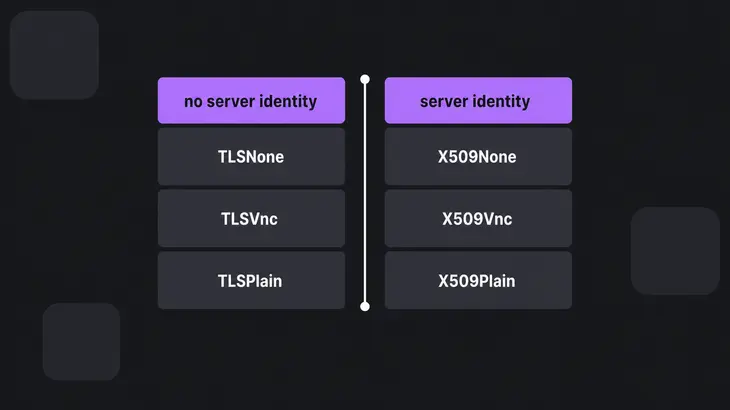
Anonymous TLS hands the viewer nothing to check, because an anonymous key exchange establishes no server identity. An attacker on the path can intercept the connection, open one encrypted session with the viewer and another with the server, and relay credentials and traffic between them. Each side holds a working encrypted session, so neither can tell the relay from the real other end.
That is the whole difference between TLSNone, TLSVnc and TLSPlain on one side and X509None, X509Vnc and X509Plain on the other. The TLS types buy you protection from a passive eavesdropper on the wire and nothing at all against something that answers as the server. Under the X509 types the viewer hands the name from your connection address to peer certificate verification, so a certificate that doesn't list that name comes back as a mismatch.
Get a baseline off a viewer before you change anything, so you have its own record of the TLS step to compare against afterwards. The diagnostics go to standard error at level 100, so the redirect is 2> and not >, and the glob needs quoting or the shell eats it:
vncviewer -Log '*:stderr:100' <server-name>:1 2> tigervnc-viewer-before.logClose the viewer and read the one line that names what the TLS layer set up. Anonymous session has been set is the baseline you're leaving, and X509 session has been set is what the same grep finds once an X509 type is in the list:
grep 'session has been set' tigervnc-viewer-before.logRead the security type, listener scope and viewer warning on your current TigerVNC server
The security type is the only thing that decides whether validation happens, and two more readings follow from it: the addresses the server listens on, and what the viewer shows when it asks for a password. Read all three off the server you already run before you touch its configuration.
The Debian wrapper reads three configuration files in order, and the later ones override the earlier ones. config.pl and the files under /etc/tigervnc take Perl assignments ending in a semicolon, while the older ~/.config/tigervnc/config takes key=value lines:
grep -hv '^[[:space:]]*#' /etc/tigervnc/vncserver-config-defaults ~/.config/tigervnc/config.pl /etc/tigervnc/vncserver-config-mandatory 2>/dev/nullOn a stock Debian 13 host that prints nothing but a bare 1;, because every other line in the shipped defaults is commented out. Open that file to set the variable permanently and the example you will find commented there is $SecurityTypes = "X509Vnc,X509Plain,TLSVnc,TLSPlain,VncAuth";, a list that forces nothing, because the viewer picks and VncAuth is still reachable with no certificate checked. With $SecurityTypes unset the wrapper falls back to its own default, VncAuth on its own, or VncAuth,TLSVnc when you pass -localhost no. Neither holds an X509 type, so nothing on that host validates a certificate, whether or not a certificate sits on disk.
The listener scope falls out of that same list rather than from a line anyone sets. The wrapper binds loopback only when the list holds no TLS or X509 type, or when it holds at least one type ending in None, and it binds every address on the machine otherwise. Hold on to that rule, because adding X509Vnc to the list moves the listener off loopback and onto the network:
ss -ltnp | grep 590Loopback is two addresses, so the loopback-only default for display :1 prints as 127.0.0.1:5901 with [::1]:5901 beside it. 0.0.0.0:5901 means any host that can route to the machine can open a VNC connection to it.
The negotiated type turns up in the server's own log for that display, which Debian names after the machine's fully qualified name:
grep 'security type' ~/.config/tigervnc/$(hostname -f):1.logThe matching line names what the viewer asked for, as in Client requests security type X509Vnc (261). VncAuth (2) or TLSVnc (258) there means no certificate was checked on that connection.
At the viewer you get a banner across the top of the VNC authentication dialog. It reads "This connection is not secure" under the TLS and plain types and "This connection is secure" under the X509 types, because it reports which type was negotiated. You only see it where the type asks for a user name or a password, so an X509None listener shows no banner at all, and a viewer reading its password from a file skips the dialog entirely.
Turn on VNC TLS certificate validation with -SecurityTypes, -X509Cert, -X509Key and -X509CA
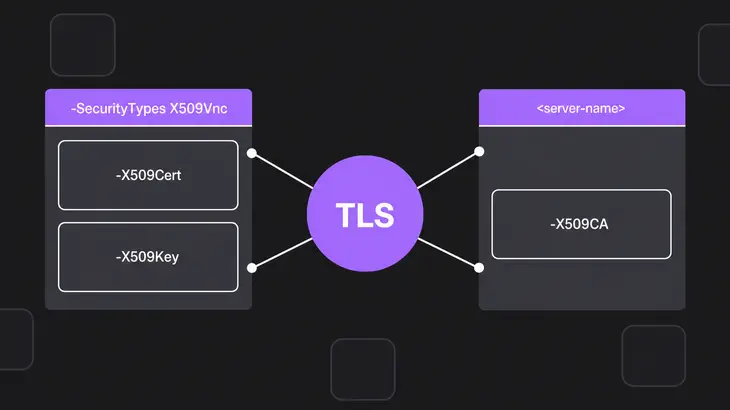
Four things have to line up: an X509 type in the server's list, the certificate and key on the server, the CA certificate on every viewer, and a name in the viewer address that the certificate carries. Miss the first and the other three sit idle. Display :1 is port 5901 in the run below, and one name, <server-name>, does for the certificate and for every viewer address.
-
Create the password file first, so the session has something gating it. X509Vnc keeps the VNC password inside the TLS session and reads it from the file the wrapper looks for,
~/.config/tigervnc/passwd. Without it the wrapper doesn't refuse: it stops to runtigervncpasswdfor you (You will require a password to access your desktops.), so a scripted or systemd restart hangs on that prompt. Create it up front and the restart stays non-interactive. If the file is already there but is group- or world-readable, the wrapper does refuse outright:~/.config/tigervnc/passwd must NOT be accessible by others. Set permission to 0600!tigervncpasswd -
The security type is the switch, so name it when you restart the display. A restart fails while the old display is still up, so kill it first:
tigervncserver -kill :1
tigervncserver :1 -SecurityTypes X509Vnc -X509Cert <cert-path> -X509Key <key-path>
Leaving
-X509Certor-X509Keyout doesn't turn X509 back off. The wrapper generates a self-signed certificate into~/.config/tigervnc/<host>-SrvCert.pemand serves that instead, and a self-signed certificate is exactly what every viewer prompts about. Passing either one suppresses that generation, so pass both.-X509Certon its own leaves the server with no matching key and no warning. By the listener rule above, the display now answers on every address, so whatever filters port 5901 is all that limits who reaches it. -
Now give the viewer something to check against. Put the CA certificate that signed the server certificate, in PEM form, on every viewer host:
vncviewer -X509CA <ca-cert.pem> <server-name>:1Drop the same file at the default path,
~/.config/tigervnc/x509_ca.pem, and every launch finds it without the option. A pass prints nothing: the authentication dialog comes straight up with the secure banner and asks for the VNC password. -
Catch a name mismatch before a viewer does. Check the certificate against the name you'll type, from any host that holds both files.
certtool --verifyfalls back to the system trust store when no CA is loaded, so an internal CA needs its certificate loaded explicitly or the chain fails whatever the name is:certtool --verify --load-ca-certificate <ca-cert.pem> --verify-hostname <server-name> --infile <server-cert.pem>The last line of the output carries the chain verification result. A pass means that same name works in every viewer address. A failure means reissue with that name, or have viewers dial a name the certificate already lists.
Confirm the chain, revocation list and viewer warning after the certificate changes
You are done when the certificate verifies for the name in the viewer address, the viewer is loading your revocation list, and the authentication dialog comes up with the secure banner and nothing in front of it.
Revocation is the piece that gets left out, because the viewer takes it from a file of its own. The viewer loads -X509CRL alongside -X509CA, and it defaults to ~/.config/tigervnc/x509_crl.pem, so a deployment that never publishes that file revokes nothing on the viewer side:
vncviewer -X509CA <ca-cert.pem> -X509CRL <crl.pem> <server-name>:1That file earns its place because a revoked certificate is the one result a viewer cannot wave through. An unknown issuer, an expired certificate, a weak signature algorithm and a name mismatch each come with that same exception prompt. A certificate on the revocation list fails outright, with Invalid server certificate and no way forward.
Check the list itself against the CA certificate your viewers hold, because the check runs against whichever CA you load and a different CA gives a different answer:
certtool --verify-crl --load-ca-certificate <ca-cert.pem> < <crl.pem>Then reconnect by the name you verified and read what comes back.
- The authentication dialog appears with "This connection is secure" and no certificate dialog ahead of it, and the viewer log holds
X509 session has been set. That is the finished state. - A dialog titled "Unknown certificate issuer" means the viewer isn't reading your CA file. Check the path you passed, or that
~/.config/tigervnc/x509_ca.pemholds the CA certificate and not a copy of the server certificate. - A dialog titled "Certificate hostname mismatch", quoting the name you typed, means the certificate doesn't list it. Reissue with that name, or dial a name it lists.
Invalid server certificatewith no dialog means the certificate is revoked, or the chain is broken in a way no prompt can cover.- A secure banner on a viewer somebody clicked through last week means an exception is carrying the connection, not your CA. Run
grep <server-name> ~/.local/state/tigervnc/x509_known_hoststo find it, and delete that line to put the real check back.
QEMU's VeNCrypt listener validates client certificates unless verify-peer is turned off
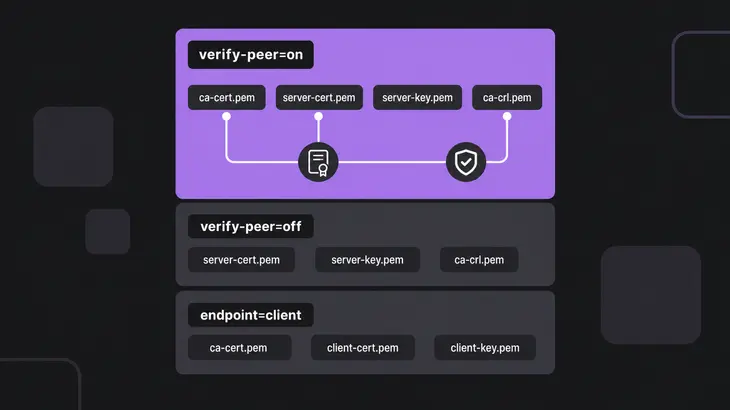
QEMU's VNC server speaks the VeNCrypt extension for TLS session encryption and X.509 authentication, and it reads its certificates out of a directory rather than from individual options. The verify-peer setting on the tls-creds-x509 object decides whether the client is asked for a certificate as well, and it defaults to enabled. QEMU's own VNC example disables it explicitly, so check that flag before you copy that line into a unit file.
| Object | Files in the credentials directory | What it validates |
|---|---|---|
endpoint=server, verify-peer=on |
ca-cert.pem, server-cert.pem, server-key.pem, plus ca-crl.pem to honour revocation |
The client certificate, against the CA certificate |
endpoint=server, verify-peer=off |
ca-cert.pem, server-cert.pem, server-key.pem |
Nothing from the client, which is never asked for a certificate |
endpoint=client |
ca-cert.pem, plus client-cert.pem and client-key.pem where the server verifies peers |
The server certificate and the name used to reach it |
Keep server-key.pem at mode 0600 so only its owner can read it. This line starts a listener on display 1 that turns away any client without a certificate from the same CA:
qemu-system-x86_64 -object tls-creds-x509,id=tls0,dir=/etc/pki/qemu,endpoint=server,verify-peer=on -vnc :1,tls-creds=tls0What the validated listener still exposes and where the SSH tunnel's own trust starts
Once the certificate checks pass, any client that can reach the port can still open a connection. A server certificate proves the server to the viewer and asks nothing of the client, and on the TigerVNC side that is the end of it: the server never requests a client certificate, and no security type authenticates a user by one. X509Vnc still gates the session on the password in ~/.config/tigervnc/passwd and X509None asks for nothing at all, so the type you pick is also your answer to who gets in.
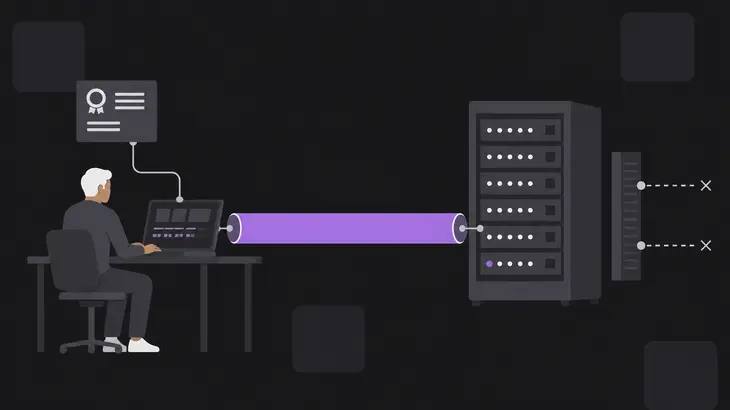
An SSH tunnel narrows who can reach the port in the first place. Put the display back on loopback with -localhost yes, which is what it takes once an X509 type has moved it off. On the remote machine:
tigervncserver -kill :1
tigervncserver :1 -SecurityTypes X509Vnc -X509Cert <cert-path> -X509Key <key-path> -localhost yes
The forward holds the terminal, so start it in one terminal on your workstation and leave it sitting there:
ssh -L 5901:localhost:5901 <user>@<remote-host>From a second terminal, with the CA file already at ~/.config/tigervnc/x509_ca.pem:
vncviewer 127.0.0.1:1That last command is where the two controls collide. The viewer checks the name in the address it dialled, so this connection compares 127.0.0.1 against the certificate. -via is no better: it rewrites the target to localhost before connecting, so that is the name checked. Over a tunnel you get the mismatch dialog unless the certificate also lists the tunnel endpoint, as an IP-address alternative name for 127.0.0.1 or a DNS name for localhost.
Pick one control and mean it. Where viewers reach the server directly by its real name, the certificate is the control and the name in the address is part of it. Where the tunnel is the control, leave the server on its default types and let the SSH host key carry the identity: a tunnel plus a certificate for a name nobody dials only teaches everyone to click through the exception prompt. SSH has the same first-connection problem the CA file solves: with no host key on record, the client cannot tell the real server from something standing in for it.
The security type is the switch. Until an X509 type sits in the server's list, a certificate and a key on disk change nothing, so that is the line to read first on any host you inherit. Then keep the CA file on every viewer, keep the revocation list beside it, and treat the name in the viewer address as part of the control, because a certificate only vouches for the names it lists.
Take the after picture by the name you verified, with vncviewer -Log '*:stderr:100' -X509CA <ca-cert.pem> <server-name>:1 2> tigervnc-viewer-after.log, then close the viewer and compare the new log with the baseline: the TLS line moves off anonymous and onto X509, and a certificate dialog in between names which check failed and what to reissue. What the CA file and the revocation list buy you is not a locked door, since an admin can still add an exception. It is that every viewer now gets told, in the one place somebody will read it, whether the server on the other end is the one your CA vouched for.
FAQs
Why does VNC TLS certificate validation fail when the certificate appears valid?
Because the viewer compares the address it dialled, not the server's real name. Dial an IP address and the IP-address alternative name is the only field consulted, so a certificate carrying the matching DNS name still fails. Check that pairing before you go looking at the certificate itself:
openssl verify -CAfile <ca-cert.pem> -verify_ip <server-ip> <server-cert.pem>-verify_ip compares an address against that field. On a failure, reissue the certificate with that address in its IP-address alternative name, or switch those viewers to a name it lists.
How do I fix a hostname mismatch without disabling VNC TLS certificate validation?
Reissue the certificate so it lists the name your viewers actually type, and leave the check on. Confirm it before any viewer sees it:
openssl verify -CAfile <ca-cert.pem> -verify_hostname <server-name> <server-cert.pem>-verify_hostname compares a name against the DNS alternative name or the common name. Once it passes, have every viewer connect by that same <server-name>. A viewer coming in over an SSH tunnel dials a different name, so it needs localhost or 127.0.0.1 on the certificate too.
Can someone get past VNC TLS certificate validation by accepting the certificate?
Yes, for everything except revocation. An unknown issuer, an expired certificate or a name mismatch each offer an exception, and the certificate somebody accepts is stored per host and trusted on later connections. So the store is where you find out whether your CA is carrying your connections or an old click is:
cat ~/.local/state/tigervnc/x509_known_hostsEvery line there is a server somebody trusted by hand. Delete the line and the next connection goes through the real check. A certificate on your revocation list is the one case no exception covers.
Discuss this in the community
Questions about this, or a setup it does not cover? Ask in Security and Remote Access.
Security and Remote Access group