Four VNC servers are worth keeping on a patch calendar: TigerVNC, TightVNC, UltraVNC and x11vnc. Three of them still ship code. x11vnc carries a banner on its own repository asking for a new maintainer, and its last code commit landed in July 2024.
What decides the rest of it is not the project's release page. It is the package version your distribution installed and what its security team has since done with that version. Debian 13 closed the 2026 x0vncserver flaw while sitting on TigerVNC 1.15.0, and Ubuntu 24.04 LTS has not yet triaged the same flaw on 1.13.1. One upstream fix, two different answers about your host.
How the upstream release, the distro package and your host line up
The VNC server on your host did not come from the project that wrote it. It came from your distribution, which froze a snapshot of that code when the release shipped and now backports security patches into that snapshot rather than moving to the newest version. There are two release streams, and only the second one is on your machine.
Upstream TigerVNC is at 1.16.2, out on 2026-03-26. Debian 13 and Fedora 43 both package 1.15.0, and Ubuntu 24.04 LTS packages 1.13.1. No stable release of any of the three carries 1.16.x.
CVE-2026-34352 shows what that costs you. In TigerVNC before 1.16.2, Image.cxx in x0vncserver lets other local users observe or manipulate the screen contents, because of incorrect permissions. Upstream meant 1.16.1 to be the fix, shipped it with every fix except the security fix, then re-released the next day as 1.16.2. Debian never took 1.16.2: it patched the flaw into trixie's 1.15.0 package, so trixie is fixed while bookworm is not. Ubuntu still has the CVE marked as needing evaluation on every release it supports.
Two hosts can both report 1.15.0 with only one of them patched. The distribution's tracker is what tells them apart.
What to read on a project before you commit a fleet to it
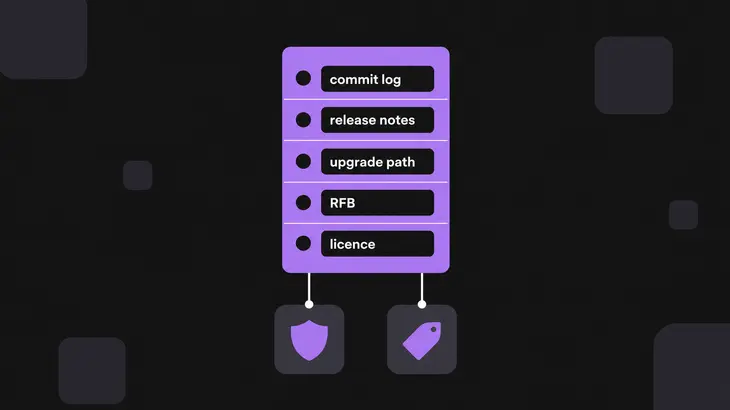
Read five things. All five are public, and none of them needs the software installed first.
- Is anyone still committing? Read the commit log, not the release list. A tag dated last year can sit on code that stopped moving the year before, which is exactly the x11vnc case.
- Did the newest release carry the fix you need? Release notes name the component. The X11 screen scraper, the Wayland server and the viewer get patched independently, so "a release shipped" is not the same fact as "the component you run got fixed".
- Is there an upgrade path across major versions? Only one of the four has a live answer here, and it is a constraint on your rollout rather than a preference.
- What protects the session, and is it on by default? RFB on its own provides no security beyond the optional and cryptographically weak password check. That check is a DES challenge-response against a password truncated to eight characters, so the password itself never crosses the wire, but the screen, the keystrokes and the clipboard all do. Either the implementation negotiates an encrypted security type or you put the session inside SSH or IPsec.
- Does the licence still fit? It can change under you. TightVNC 2 was GPL-2.0, and version 4 is a free base with a paid tier holding the session encryption.
Where the four stand today
| Option | Where it runs | Maintenance signal, and where to read it | Latest from the project | Licence |
|---|---|---|---|---|
| TigerVNC | Linux and Unix server, viewer also on Windows and macOS | Tagged releases plus an active commit log on GitHub | 1.16.2, 2026-03-26 | GPL-2.0 |
| TightVNC | Windows for the 4.x line; the Unix and Java builds never left 1.3.10 | The vendor version history page | 4.0.2 for Windows, 2026-10-28 | Free base plus a paid tier; version 2 was GPL-2.0 |
| UltraVNC | Windows only: Server, Viewer, Repeater and SC | The commit log, because the repository publishes no releases and no tags | 1.8.3.1, version bump committed 2026-10-18 | GPL-3.0 |
| x11vnc | Linux and Unix, attached to an X11 display that is already running | The repository banner, which asks for a new maintainer | 0.9.17, tagged 2025-05-01; last code commit 2024-07-14 | GPL-2.0 |
Pick TigerVNC for a new Linux deployment. The reason is the stream rather than the feature list: it tags releases, the commit log keeps moving, and three distributions package it, so a backport has somewhere to land. Version 1.16.0 added w0vncserver for sharing a Wayland desktop with no X11 session behind it, and none of the three distributions above package a version that has it yet. The one place to think twice is RHEL 9, where the server packages are already on the deprecation list and slated for removal in a future major release.
TightVNC 4 landed on Windows this month, new enough that your notes are out of date, and it stays a Windows story: the Unix and Java builds stopped at 1.3.10. SRP-6a password authentication replaces the eight-character VNC password, so long passwords and international characters work. Budget for two things before you roll it out. Installing version 4 alongside 2.x is not supported, so version 4 upgrades the existing install and you get no trial run on the same box. And authentication is not encryption: the session stays in the clear unless you buy the Pro tier or tunnel it.
UltraVNC gets regular work and publishes none of it as a release. There are no tags and no releases on the repository, so you date your copy from the commit log, where a 1.8.3.1 version bump landed on 2026-10-18. Change control that wants a signed release artefact with notes attached will not get one here.
Stop deploying x11vnc. The call for a new maintainer has been open since January 2022, 0.9.17 was tagged on 2025-05-01, and the last code commit before it was July 2024. It still runs, so leave the installs you have behind SSH and point new work at x0vncserver, which attaches to a live X11 display the same way and comes out of a package stream you already patch.
Which one for which job
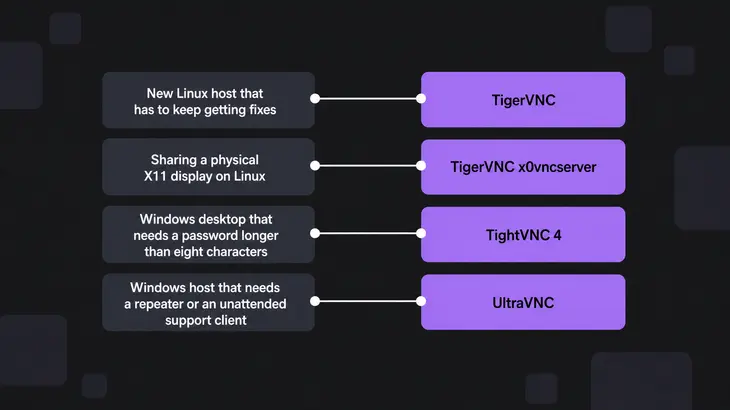
| The job | The pick | Why it falls out that way |
|---|---|---|
| New Linux host that has to keep getting fixes | TigerVNC | The only one of the four with tagged releases and distribution packages on Linux, with RHEL 9 the exception |
| Sharing a physical X11 display on Linux | TigerVNC x0vncserver | x11vnc does the same job with no maintainer behind it |
| Windows desktop that needs a password longer than eight characters | TightVNC 4 | SRP-6a replaces the eight-character VNC password |
| Windows host that needs a repeater or an unattended support client | UltraVNC | Repeater and SC ship as part of the same project |
Whichever row you land on, the session is not encrypted until you wrap it, so build the tunnel into the rollout instead of bolting it on after the first audit. From your workstation:
ssh -L 5901:localhost:5901 <user>@<server-host>That shell holds the tunnel open, so leave it running and point the viewer at your own loopback from a second terminal.
vncviewer localhost::5901The double colon is what makes 5901 a port instead of a display number.
Checks to run on the host in front of you

The steps below are for Debian 13 and Ubuntu 24.04 LTS, and what changes elsewhere is listed after them.
-
Read the package version, because that is the number the security tracker answers about. The server package is
tigervnc-standalone-server.dpkg -s tigervnc-standalone-server | grep '^Version:'Ubuntu 24.04 LTS prints
1.13.1+dfsg-2build2and Debian 13 prints1.15.0+dfsg-2.1~deb13u1. That~deb13u1suffix is the backport, and it is the part of the string that tells you whether you are patched. -
Find out where the server is listening before you change anything. On display
:1that is port 5901.ss -ltnp | grep 5901A stock session answers on
127.0.0.1:5901, and on[::1]:5901too. It is loopback-only because the wrapper's security type list isVncAuthon its own, with nothing TLS-shaped in it. -
Expect the bind address to move the moment you touch that list. The wrapper listens on localhost only while the type list holds no TLS or X509 type, so adding
tlsvncby itself publishes the service on every address the machine has. Pin the listener in the same edit. The key-and-value file is~/.config/tigervnc/configon Debian 13 and~/.vnc/configon Ubuntu 24.04.securitytypes=vncauth,tlsvnc localhostRestart the instance and read the listener again.
sudo systemctl restart tigervncserver@:1.service
ss -ltnp | grep 5901
It should still answer on
127.0.0.1:5901. If it comes back on anything other than loopback, thelocalhostline did not take and you have just put the desktop on the network. Note too thatvncauthis still in the list, which leaves the viewer free to pick it and skip TLS entirely; narrow the line tosecuritytypes=tlsvncwhen you want TLS to be the only thing on offer. -
On an x11vnc host, expect the server to go away under you. It exits as soon as the first viewer disconnects, because
-onceis the default, so anything you plan to reconnect to needs-forever.x11vnc -foreverRun it from a terminal inside the desktop session and it takes the display from
$DISPLAY, so there is no display number to get wrong. It stays in the foreground and holds that terminal, so give it one of its own.
On Fedora and RHEL 9 the same four checks work under different names. The package is tigervnc-server, queried with rpm -q tigervnc-server; the unit is vncserver@.service rather than tigervncserver@.service; and the wrapper binary is vncserver rather than tigervncserver. That wrapper is a different program from the Debian one and carries its own defaults, so read vncserver(1) on the host before you copy the security type and listener lines above rather than assuming they land the same way.
Pick TigerVNC for Linux, with RHEL 9 the one place to check your roadmap first. It is the only one of the four with tagged releases, a commit log that keeps moving and packages in the distributions, and those three together are what let a backport reach your host at all. On Windows, TightVNC 4 when the eight-character password limit is what hurts, UltraVNC when you need the repeater or the unattended support client. x11vnc still runs and no longer gets fixes, so leave what you have behind SSH and plan the move off it.
Then put the package query on the same calendar as the patching. The number that matters is what dpkg -s or rpm -q prints, checked against your distribution's security tracker rather than against the newest upstream tag, because a backport leaves a patched host and an unpatched host showing the same version string.
FAQs
How often should VNC servers be patched for enterprise security compliance?
On the cadence your distribution publishes, not the project's. An upstream release is the wrong trigger: the x0vncserver fix reached Debian 13 inside a 1.15.0 package, so a host waiting for a 1.16 build would still be waiting. Subscribe to your distribution's security announcements, let automatic installation of security upgrades or dnf5-plugin-automatic apply them, and treat a new upstream tag as a reason to check the tracker rather than a reason to build from source. The exception is anything with no distribution package behind it, such as an x11vnc you compiled yourself. Nobody is backporting to that, so the upstream tag is all you get and you own the rebuild.
Discuss this in the community
Questions about this, or a setup it does not cover? Ask in Open Source VNC.