Layered controls provide VNC brute force protection, and each acts at a different point between the viewer and the desktop: the server's failure handling together with a ban tool, an SSH forward in front of the listener, and limits on accounts and installs. Run ss -l to read which listening sockets a guessing client can reach.
Who can reach the service after the change depends on which hosts the firewall scope still lets connect to a listener and on who holds valid credentials. Every permitted host can still submit guesses, and a correct one opens a session as the logged-on user, with that user's rights on other systems. Controls written for a single VNC server leave other implementations on the host untouched.
From listener to desktop: where a VNC password-guessing attempt meets each layer
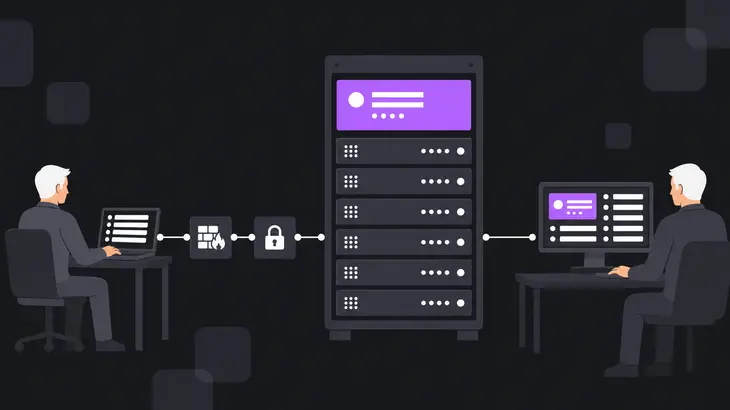
A VNC viewer opens a connection to the server's listener, and the server answers with a password check over RFB. Every guess is one more run of that exchange. An automated client repeats it for as long as the listener keeps accepting connections from its address. Any limit on the number of guesses has to come from a layer on the host.
A guess that succeeds hands over the logged-on user's desktop. Through interactive access to that desktop an intruder can open documents, download files, run commands, monitor the user and collect data. A session opened with valid credentials operates the system as the logged-on user and can pivot to other systems that user can reach. Whatever rights that user holds are what a successful guess hands over.
The server's own failure handling stops serving an address after repeated failures. Ban tooling reads those failures from the logs and blocks the address, a secure channel in front of the listener moves the viewer's connection off the open port, and account and install scope limits who can log in and what VNC software exists. Firewall scope decides which hosts reach the listener at all. Each acts at a different point on the path from the viewer to the desktop.
Find the 5900-range listeners a guessing client can reach, with ss -l
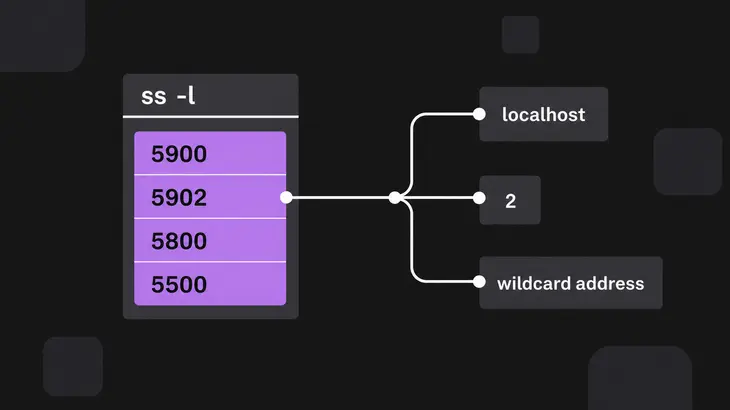
An RFB client contacts the server on TCP port 5900, and on a host that runs several RFB servers, server N typically listens on port 5900+N. A host serving displays 1 and 2 therefore shows listeners on 5901 and 5902. Browser-based access defaults to TCP port 5800, and a viewer in listening mode defaults to TCP port 5500. Each additional display adds another listener to the list you read.
Base RFB provides no security beyond an optional, cryptographically weak password check. RFB negotiates a security type during the handshake, and later traffic can use an encrypted or otherwise altered channel when both ends agree on an extended type. SSH and IPsec are the secure-channel options for protecting an RFB connection. A listener with nothing in front of it leaves that check as the only barrier to guessing.
The ss -l command displays only listening sockets, which ss omits by default. Read the local address column for ports at 5900 plus a display number, 5800, 5500, and any nonstandard port a VNC server was told to use. Subtracting 5900 from a port in that range gives the display number, so a listener on 5902 belongs to display 2. A listener on a wildcard address answers every interface. A listener on localhost answers only the host itself.
ss -l
Filtering or blocking the default ports stops traffic that uses them, and an installation configured on a nonstandard port falls outside that filter. On RHEL 9, allowing the vnc-server service in firewalld opens ports 5900 to 5903, which covers displays 0 to 3. The command that makes it persistent is firewall-cmd --permanent --add-service=vnc-server, so look for it in your provisioning scripts and history when a host answers on one of those ports and nobody remembers opening it.
Read the TigerVNC config files, listener and sshd forwarding policy before changing anything
This single command reads the TigerVNC config files, the effective listener and the sshd forwarding policy in one pass. Run it before you change anything so you know which authentication model is active and what can reach it. The 2>/dev/null suppresses the error for any of the three files that does not exist.
grep -H . /etc/tigervnc/vncserver-config-defaults /etc/tigervnc/vncserver-config-mandatory ~/.config/tigervnc/config 2>/dev/null; sudo ss -tlnp | grep 590; sudo sshd -T | grep -Ei 'allowtcpforwarding|permitopen|disableforwarding'
| Check | Command part | What the output shows |
|---|---|---|
| TigerVNC config files | `grep -H .` on the three config paths | Every non-empty line, prefixed with its file name |
| Effective listener | `sudo ss -tlnp`, filtered on `590` | Listening TCP sockets whose port matches 590, with the owning process |
| sshd forwarding keys | `sudo sshd -T`, filtered for `allowtcpforwarding`, `permitopen` and `disableforwarding` | The effective value of each forwarding key |
VNC may use system authentication by default, and some implementations can be configured with VNC-specific credentials. Read the lines the config files print for any setting that gives VNC its own credentials, because weak or exposed credentials allow automated password guessing and unauthorized remote sessions. On a TigerVNC host, those files are where you read that choice.
VNC brute force protection on the host: -UseBlacklist and Fail2Ban maxretry
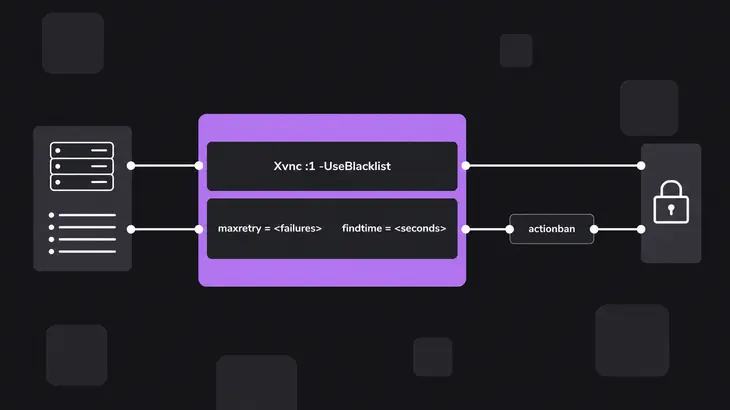
The server's own blacklist and a Fail2Ban ban each make an address stop being served after repeated failed logins.
-
Keep
-UseBlacklistenabled on Xvnc, where it defaults to on.Xvnc :1 -UseBlacklistXvnc temporarily rejects connections from a host that repeatedly fails to authenticate, so guesses from that host stop being answered for the length of the rejection. Because the rejection comes from the server itself, it applies whether or not any log-reading tool runs on the host.
-
Put the Fail2Ban thresholds in the jail that watches the VNC server's log.
maxretry = <failures> findtime = <seconds>maxretryis the number of failures within the lastfindtimeseconds that causes an IP ban. Once matching log lines reach that threshold inside the window,actionbanruns the configured ban command. On your own host, set<failures>above what a person mistyping a password reaches, and set<seconds>long enough that a slow guesser's failures still accumulate in the window.
Forward 5901 through ssh -N -L so the viewer reaches the server inside an SSH channel
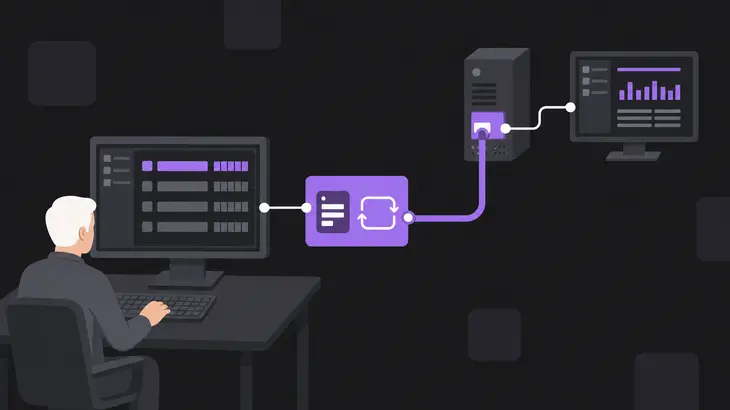
OpenSSH local forwarding carries connections from a local listening port over the secure channel to a host and port reached from the remote machine. The viewer connects to that local port on your workstation, and its traffic reaches the server inside the SSH channel. The syntax is ssh -L [bind_address:]port:host:hostport destination, and sshd's forwarding policy has to permit the forward through the allowtcpforwarding, permitopen and disableforwarding keys.
-
Run the forward from your workstation. The
-Noption runs no remote command, which suits port forwarding only, so the command stays open with no remote shell and the viewer connects to localhost on the workstation's forwarded port.ssh -N -L 5901:localhost:5901 <user>@<server-host>The server's display 1 listens on port 5901 on the server, and
localhostin the forward is resolved on the server. -
Add an explicit bind address when other users or hosts on the workstation's network must not reach the forwarded port. An explicit
localhostbind address limits the listening port to local use. Run this form in place of the first one, since both listen on local port 5901.ssh -N -L localhost:5901:localhost:5901 <user>@<server-host>
Cap who can log in and what runs: root sessions, install rights and unused VNC servers
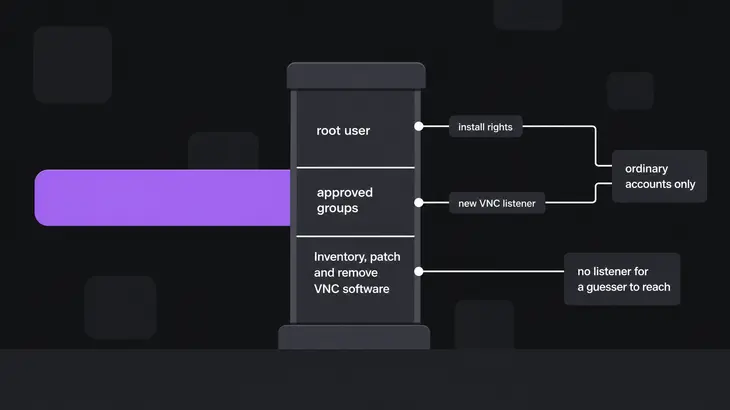
Account and install scope shrinks who can log in over VNC and how many VNC servers exist to be guessed at.
-
Export no VNC session for the root user. On RHEL 9, exporting a VNC session for the root user is advised against. A guessed password for a root session opens a desktop logged in as root. On a host that follows this, VNC sessions belong to ordinary accounts only.
-
Limit VNC installation to approved user groups. A VNC server generally has to be installed manually by a user or an adversary, so restricting software-installation privileges reduces unauthorized deployment. Install rights stay with the approved groups, and everyone else loses them. A new VNC listener then has fewer ways to appear on the host.
-
Inventory, patch and remove VNC software. Some VNC libraries and implementations have been susceptible to brute-force attacks, memory-exhaustion issues and other vulnerabilities, so VNC software is inventoried, patched and removed from workstations and servers that do not need remote desktop access. A host without a VNC server has no listener for a guesser to reach.
Verify the layers with ss -l, the forwarded session and process-to-log correlation
-
Run the listener check again and read the local address of each socket. A listener on a wildcard address is still open to every host the firewall lets through, and a listener on localhost answers only the host itself, which is where the forward connects.
sudo ss -tlnp | grep 590 -
With the
ssh -N -Lforward running in its own terminal, point the viewer at localhost on the workstation's forwarded port. The session comes up through the SSH channel when sshd's forwarding policy allows it. -
Line up each x11vnc or vncserver process start with authentication log entries, new user-session creation and listening on TCP port 5900. That correlation helps separate legitimate remote support from unauthorized access or brute-force activity.
A listener that survives on a default port stays reachable until the port is filtered, and one on a nonstandard port falls outside a filter written for the defaults. A VNC process that appears without an approved change, administrator action or maintenance window is suspicious.
What stays reachable after the layers: permitted sources, valid credentials and other VNC products
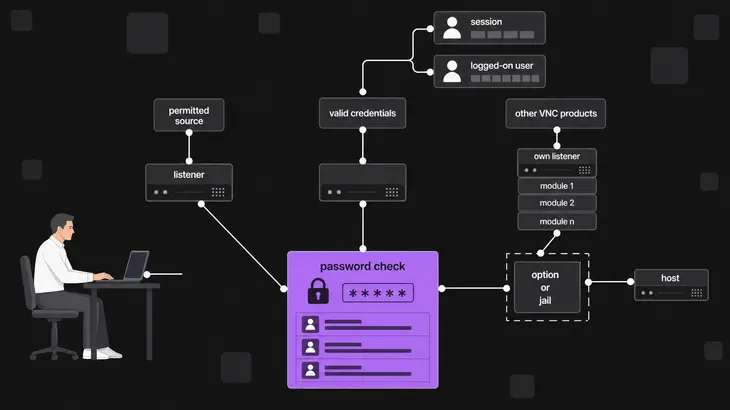
- Firewall rules restrict VNC access to approved administration networks, VPN address ranges or specific trusted hosts, and unused VNC ports are blocked. Every host inside that scope can still reach a listener and submit guesses.
- A session opened with valid credentials runs as the logged-on user. After the session is created, simulated mouse and keyboard activity is detectable. On systems that record Unified Logs,
screensharingdactivity correlates with remote logins and unusual user interaction. - Threat activity has involved TightVNC, UltraVNC, Keyhole VNC and VNC modules embedded in malware. A control written for one product leaves other implementations and embedded modules outside its scope, so controls tied to VNC behavior and network exposure are the ones that apply across them.
A permitted source reaches the listener through the firewall scope and meets the password check there. Valid credentials reach the desktop through that same check, and the session then runs as the logged-on user. Another implementation or an embedded module reaches the host through its own listener, outside any option or jail written for one server.
On your own host, I would make the SSH forward the normal way in and leave the server's blacklist and the Fail2Ban jail to carry VNC brute force protection for every address that can still reach a listener. Together they cap how many guesses one address gets before it stops being answered.
Next, run the sudo ss -tlnp listener check again once the forward is running, and read the local address of each VNC socket still listed. Any wildcard address is the listener to bring under the forward or the firewall scope. Through the ssh -N -L forward, the viewer reaches the VNC listener only inside the SSH channel that sshd's forwarding policy permits, and the server stops answering an address that keeps failing authentication.
FAQs
How does Fail2Ban block repeated VNC login failures?
Fail2Ban blocks them through a jail, which combines a filter with an action. A filter specifies how to detect authentication failures in the log, and the action is the ban that runs against the address that triggered it. Filter files sit in /etc/fail2ban/filter.d/*.conf.
Discuss this in the community
Questions about this, or a setup it does not cover? Ask in Security and Remote Access.
Security and Remote Access group