There's no native Windows build of Remmina. On a Windows machine you run the Linux client in Ubuntu on WSL 2, and WSLg puts its window on your desktop. From the Ubuntu shell, remmina -c vnc://<user>@<server> opens a VNC session to <server>, the machine running the VNC server. The current release is 1.4.43.
If the machine can't run WSL 2 with GUI support, stay native: mstsc covers RDP, a Windows VNC viewer covers VNC, and mRemoteNG keeps several protocols in one tabbed window.
Why there's no Remmina installer for Windows, and what runs it instead

Remmina leans on GTK+ and GDK functions that Windows doesn't have, which is why the project's 2018 post on Windows said a native build wasn't possible yet. The workaround in that post was a full Ubuntu under WSL, and it's still the route: the project's install guide covers Linux packages and Flatpak and nothing for Windows.
Here's how the pieces fit. Remmina runs inside Ubuntu on WSL 2, WSLg draws its window on your Windows desktop, and the machine you name in the connection runs the VNC, RDP or SSH server. Remmina shows that server's screen and sends your keyboard and mouse back.
If you'd rather not run Linux at all, use a native client per protocol: mstsc for RDP and a Windows VNC viewer for VNC. Both are covered at the end.
Get WSL 2 with GUI support
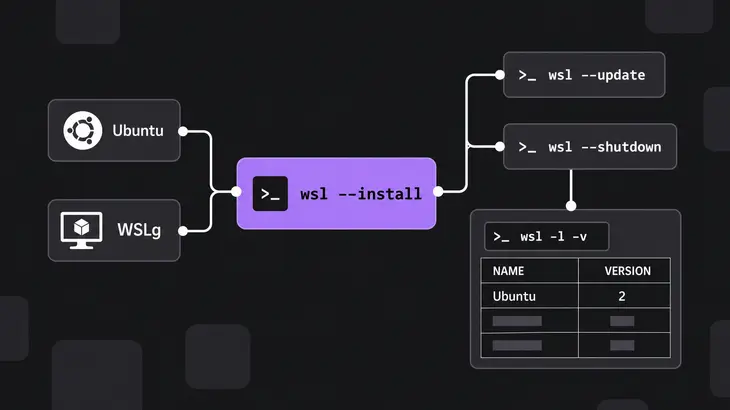
You need Windows 10 version 2004 (build 19041) or later, or Windows 11, for the wsl --install command. Remmina is a GUI app, so it also needs WSLg, and that raises the bar to Windows 10 build 19044 or Windows 11, with the distribution running under WSL 2.
Open PowerShell as administrator and run the install. It turns on the WSL features and installs Ubuntu, which is currently Ubuntu 26.04 LTS, so you don't name a distribution, and a distribution installed this way lands on WSL 2. Restart the machine when it finishes; after the reboot the setup continues and asks you for a Linux username and password.
wsl --installAlready had WSL? Update it to the release with GUI support, then restart WSL from the same elevated PowerShell.
wsl --updatewsl --shutdownEither way, check that Ubuntu shows 2 in the VERSION column. On WSL 1 you get no display for GUI apps.
wsl -l -vInstall Remmina from Ubuntu's archive and open the window
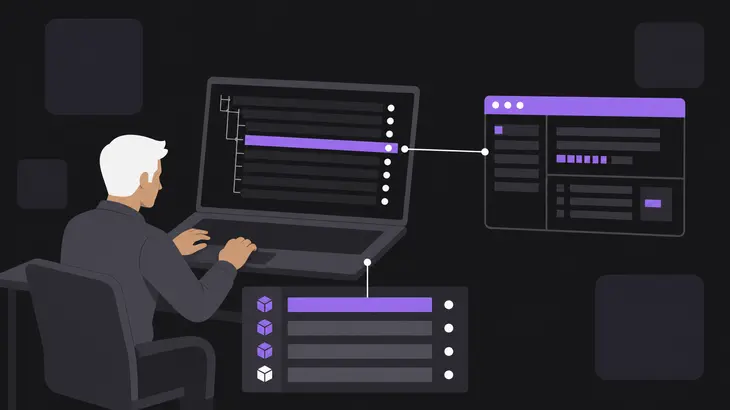
Everything from here until the Windows-side clients at the end runs in the Ubuntu shell. Ubuntu 24.04 and 26.04 carry Remmina 1.4.43, the latest release, in their updates, and apt pulls in the RDP, VNC and secret plugins as recommended packages, so one package name does it.
sudo apt updatesudo apt install remminaThe archive package reports org.remmina.Remmina - 1.4.43 (git n/a).
remmina --versionNow run remmina. The main window should open on your Windows desktop. If nothing appears and the shell prints Gtk-WARNING **: cannot open display:, WSLg isn't serving your distribution. In a working WSLg session, $DISPLAY is :0; if it's empty, recheck wsl -l -v and the Windows build.
echo $DISPLAYConnect from the command line with a URI or a saved profile

You don't have to click through the profile list. remmina -c (long form --connect) opens a connection straight from an RDP, VNC or SSH URI, or from a saved .remmina file. The host in the URI is the machine running the server.
For a one-off VNC session, replace <user> with your account and <server> with the VNC host.
remmina -c vnc://<user>@<server>That dials port 5900. For any other port, put it after the host. Remmina reads a value under 100 as a display number, so :1 and :5901 reach the same server. If the server has a VNC password, an Enter VNC password dialog comes up before the desktop does.
remmina -c vnc://<user>@<server>:5901RDP has the same shape, with <server> running the RDP server.
remmina -c rdp://<user>@<server>For a host you open every day, save a profile once and point -c at its file. The apt package keeps each profile as its own file in ~/.local/share/remmina/ with an autogenerated name, and you can also write one by hand under a name you choose. Give -c the full path: a bare file name is opened from the current directory, not from the profile directory.
~/.local/share/remmina/<profile>.remminaremmina -c ~/.local/share/remmina/<profile>.remminaWhen you're done, remmina -q closes every open connection without asking and quits Remmina.
remmina -qKeep a VNC session encrypted: what disableencryption and the SSH tunnel do
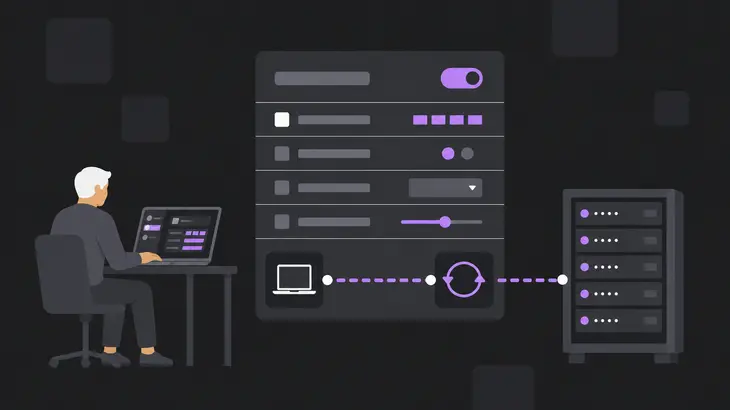
Don't count on the VNC layer to encrypt anything. With disableencryption at its default 0, Remmina takes the first security type in the server's list that it supports, so you get encryption only when the server offers an encrypted type first. Setting it to 1 limits Remmina to None, VNC password and MS-Logon, which leave the session in the clear.
For a server that listens on localhost only, let SSH do the work. In the profile's SSH Tunnel tab, turn on Enable SSH tunnel, keep the same server on SSH port 22 and tick Tunnel via loopback address. That saves ssh_tunnel_enabled=1 and ssh_tunnel_loopback=1. The loopback key decides where the SSH server sends the session: 1 hands it to the server's own 127.0.0.1, 0 to the host name in the profile. Remmina's end of the tunnel always listens on 127.0.0.1 on your machine.
| Setting | Protocol | Values | What it does |
|---|---|---|---|
disableencryption |
VNC | 0, 1 |
1 allows only None, VNC password and MS-Logon. 0, the default, takes the server’s first supported type. |
ssh_tunnel_loopback |
SSH tunnel | 0, 1 |
1 makes the SSH server forward to its own 127.0.0.1; 0 forwards to the profile’s host name. |
security |
RDP | rdp, tls, nla, ext |
Sets that RDP security layer. Any other value lets FreeRDP negotiate it with the server. |
On RDP, set security only when the host accepts a single layer; otherwise leave the negotiation to FreeRDP.
Other install routes: the PPA and the Flatpak
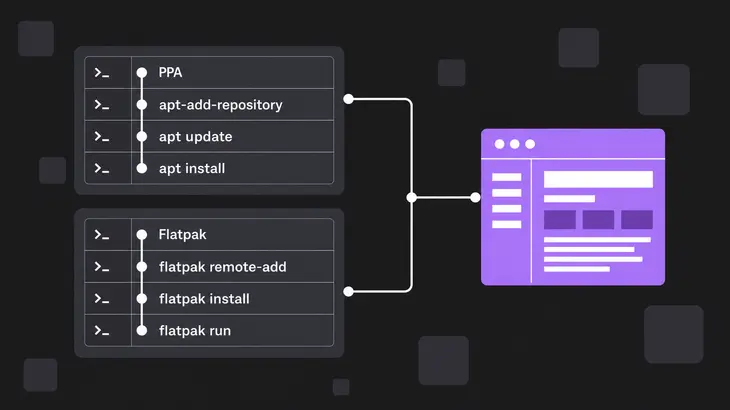
The archive is already current, so you need neither of these today. On Ubuntu 24.04, if you want packages straight from the Remmina team, add their PPA; it was at 1.4.43 when their guide was written. Skip it on 26.04, the release wsl --install gives you now: the PPA has no 26.04 build, so apt update stops with an error that the PPA's Release file is missing. Run the three commands in this order, because apt install only finds the packages after apt update has read the PPA that apt-add-repository adds. If your shell can't find apt-add-repository, install software-properties-common first. The guide installs the RDP and secret plugins by name, and the VNC plugin still arrives as a recommended package.
sudo apt-add-repository ppa:remmina-ppa-team/remmina-nextsudo apt updatesudo apt install remmina remmina-plugin-rdp remmina-plugin-secretThe guide also lists a Flatpak, org.remmina.Remmina. Stock Ubuntu has no flatpak command, so install that first. Flathub's Ubuntu setup asks for a restart afterwards, and under WSL that means wsl --shutdown from PowerShell.
sudo apt install flatpakThe three commands below add Flathub for your account only (--user), skip the remote if you already have it (--if-not-exists), install Remmina and start it.
flatpak remote-add --user --if-not-exists flathub https://flathub.org/repo/flathub.flatpakrepoflatpak install --user flathub org.remmina.Remminaflatpak run --user org.remmina.RemminaThe catch with the Flatpak is that it keeps its files under ~/.var/app/org.remmina.Remmina/, so it doesn't see the profiles the apt package saved, and the other way round.
| Install method | Preferences | Profiles |
|---|---|---|
| apt package (archive or PPA) | ~/.config/remmina/ |
~/.local/share/remmina/ |
| Flatpak | ~/.var/app/org.remmina.Remmina/config/remmina/ |
~/.var/app/org.remmina.Remmina/data/remmina/ |
If a saved connection is missing, list the profile directory of the install you're running. Each profile is a single file, so copying it into the other directory brings the connection across.
ls ~/.local/share/remmina/ls ~/.var/app/org.remmina.Remmina/data/remmina/Staying on Windows: mstsc for RDP, a native VNC viewer, or mRemoteNG
For RDP targets, the client that ships with Windows does the job without WSL. Run mstsc on the Windows side, from PowerShell or cmd, not from the Ubuntu shell. It takes the host, and optionally a port, on /v:.
mstsc /v:<server>mstsc can save a connection as an .rdp file, by default in your Documents folder, and Remmina's RDP plugin imports those files, so one file serves both clients. From Ubuntu, give -c the file's quoted /mnt/c path: remmina -c "/mnt/c/Users/<windows-user>/Documents/<file>.rdp". If OneDrive backs up your Documents folder, the file sits under your OneDrive folder instead, so adjust the path.
On a host joined to an Active Directory domain, /remoteGuard keeps your credentials from being sent to the remote PC. It needs Kerberos and a delegation policy on the host, and it doesn't work against workgroup PCs or hosts joined only to Microsoft Entra ID.
mstsc /v:<server> /remoteGuard/multimon gives the session the same monitor layout as your desk, so two local monitors become two remote ones.
mstsc /v:<server> /multimonFor VNC targets, use a native viewer. TigerVNC's 1.16.2 release ships a 64-bit Windows viewer, vncviewer64-1.16.2.exe, next to its installers. RealVNC Viewer comes as an installer, or as a standalone binary when you don't have admin rights.
If what you liked about Remmina was one window for every protocol, mRemoteNG is the open-source equivalent on Windows: tabbed connections for RDP, VNC, SSH, Telnet, HTTP/HTTPS, rlogin and raw sockets. Its last stable release is 1.76.20 from 2019, and current builds ship as nightly pre-releases.
Version and licence
The latest release is v1.4.43, from February 20, 2026, and that's what Ubuntu 24.04 and 26.04 install. A WSL distribution on Ubuntu 22.04 gets 1.4.25. Remmina is free software under the GNU GPL version 2 or later.
Settle how each VNC connection is encrypted before you point it at anything across a network, because Remmina won't insist. At the default disableencryption=0 you get encryption only when the server offers it first, so for a server you reach over the LAN or the internet, keep the VNC server on localhost and save the profile with Enable SSH tunnel and Tunnel via loopback address. SSH then carries every session you open from that profile.
FAQs
Does Remmina work under WSL 1?
No. WSLg runs Linux GUI apps only under WSL 2, so a distribution on WSL 1 gives Remmina no display. Convert the distribution from PowerShell:
wsl --set-version Ubuntu 2Can I start Remmina from the Windows Start menu?
Yes. Once the package is installed, WSLg lists Remmina in the Start menu under Ubuntu, and you can pin it to the taskbar like any Windows app.
Does copy and paste work between Windows apps and a remote desktop in Remmina?
Yes, in two hops. WSLg passes cut and paste between Windows and Linux apps, and Remmina's VNC plugin syncs the clipboard with the server unless the profile's Turn off clipboard sync option (disableclipboard) is on. Text you copy in a Windows app pastes into the remote VNC desktop.
Discuss this in the community
Questions about this, or a setup it does not cover? Ask in Open Source VNC.