noVNC is a VNC viewer that lives in a browser tab. You open a page, click Connect, and the remote desktop draws right there. Nothing gets installed on the machine you're sitting at, and it runs in modern desktop and mobile browsers.
The catch is that it's only the viewer. You still need a VNC server, and noVNC needs WebSockets where other VNC clients open a plain TCP connection. Unless your server speaks WebSocket itself, websockify sits in the middle and turns the WebSocket traffic back into a normal TCP socket.
A library, an app, and who already ships it
Underneath is a JavaScript library with one RFB object per connection. On top sits vnc.html, the app with the toolbar, settings and connect dialog, and that's the part you'll use unless you're embedding a console in your own page. If you've opened a VM console in OpenStack or OpenNebula, you've probably used noVNC already: both of them, and ThinLinc too, have it built in.
Samuel Mannehed and Pierre Ossman of Cendio make up the core team, and the code is mainly under MPL 2.0.
The client speaks these security types: none, classical VNC, RealVNC RSA-AES, Tight, VeNCrypt Plain, XVP, Apple Diffie-Hellman and UltraVNC MSLogonII, and the server sends the list it offers. noVNC takes the first type on that list that it supports, and an RFB 3.3 server simply names one. none is on the client's list, so a VNC server with no password hands its desktop to anyone who can load the page. Put a password on the server before you go any further.
How the browser, websockify and the VNC server fit
Three parts, two hops. With the VNC server on display :1 and websockify on port 6080:
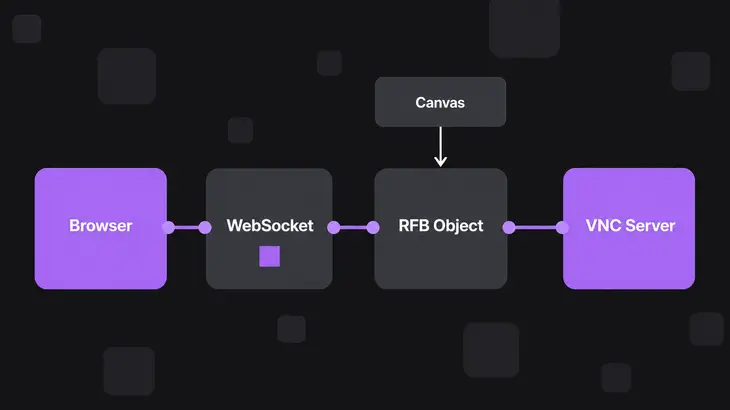
browser (vnc.html + JS) --HTTP and WebSocket, TCP 6080--> websockify --plain TCP 5901--> VNC server on :1- The browser fetches
vnc.htmland its JavaScript over HTTP, then opens a WebSocket back to the same host and port, on the pathwebsockify. If the page came over HTTPS, that socket iswss://. Inside it, theRFBobject runs the ordinary RFB handshake: it agrees on a protocol version and a security type with the server, then reads the framebuffer size, pixel format and desktop name from ServerInit. After that it asks for the whole screen once and for changes only, paints them into a canvas, and sends your keystrokes and mouse back up the same socket. - websockify takes the WebSocket handshake and forwards bytes both ways between the browser and the VNC port. Give it
--weband it serves the noVNC files too, so one port carries the page and the session. - The VNC server sees an ordinary RFB client. It listens on 5900 plus the display number, so
:1is TCP 5901.
websockify only reframes bytes. The VNC protocol runs end to end between the browser and the server, so the password and the security type get settled between those two, not by websockify. Servers with built-in WebSocket support, such as x11vnc/libvncserver and QEMU, take the browser connection directly, and you can leave websockify out.
Getting it running on Debian 13 or Ubuntu 24.04
The main path: a VNC server already up on display :1, websockify on localhost port 6080, and you on your workstation reaching it through SSH. Fedora and the upstream script come after, and only a few lines change there.
First make sure the server is actually listening. noVNC can't do a thing until something answers on 5901:
ss -ltn | grep 5901ss with -ltn lists listening TCP sockets with numeric ports. A LISTEN line on 127.0.0.1:5901 or 0.0.0.0:5901 and you're set. Empty output means the VNC server isn't running yet, so start that first.
Install the package. On both releases it pulls in websockify and puts the web app in /usr/share/novnc:
sudo apt install novncThen start websockify as your normal user, serving the noVNC files and proxying to the VNC server:
websockify --web /usr/share/novnc localhost:6080 localhost:5901The first address is where websockify listens and the second is the target. Leave the host off the listen address and it binds every interface, so keep localhost: there until TLS is in place. It stays in the foreground and prints its settings:
WebSocket server settings:
  - Listen on localhost:6080
  - Web server. Web root: /usr/share/novnc
  - No SSL/TLS support (no cert file)
  - proxying from localhost:6080 to localhost:5901
Listen on localhost:6080 is the line to look at. If it reads Listen on :6080, the host fell off and websockify is answering on every interface.
On your workstation, forward the port over SSH:
ssh -L 6080:localhost:6080 <user>@<server-host>Browse to http://localhost:6080/vnc.html and click Connect. If the server has a password, the status bar shows Credentials are required and asks for it. Once you're in, it reads Connected (unencrypted) to followed by the desktop name. Don't let "unencrypted" worry you. That label follows the app's Encrypt setting, which defaults to whether the page came over HTTPS, and here SSH is encrypting the hop underneath. Back in the websockify terminal, each browser connection logs a line ending in connecting to: localhost:5901.
The tunnel also keeps noVNC's HTTPS warning away. The app shows it only outside a secure context, and browsers count http://localhost as one.
Ctrl+C in the websockify terminal stops it. If you started it in the background with -D, match its full command line to stop it:
pkill -f 'websockify --web /usr/share/novnc'You'll also find /usr/share/novnc/utils/novnc_proxy in the package, the wrapper from the upstream quick start. It runs the same kind of websockify command, but its defaults bite: it listens on port 6080 on every interface and targets localhost:5900. Run it without --vnc against a server on :1 and websockify logs Failed to connect to localhost:5900 the moment you click Connect. Calling websockify directly keeps the bind address and the target in plain sight.
Letting colleagues in from their own browsers
If you're the only one connecting, stay on the SSH tunnel. When colleagues need the desktop from a browser alone, put TLS on websockify before you drop localhost: from the listen address. Load the page over plain HTTP from another machine and noVNC 1.5.0 or later (Debian 13, Fedora 43) puts Running without HTTPS is not recommended, crashes or other issues are likely. in the status bar, because the app leans on browser APIs that need a secure context.
websockify --web /usr/share/novnc --cert <cert.pem> --key <key.pem> --ssl-only 6080 localhost:5901
sudo ufw allow 6080/tcp
--ssl-only refuses unencrypted connections and the ufw line opens the port on hosts where ufw is enabled; the firewalld version is further down. The startup output now reads - SSL/TLS support and - Deny non-SSL/TLS connections. Browse to https://<server-host>:6080/vnc.html. The page came over HTTPS, so the app opens the WebSocket as wss:// on the same port, one certificate covers both, and the status bar now reads Connected (encrypted) to.
Use a certificate the browsers already trust. With a self-signed one, every user has to click through the certificate warning when the page loads, and that acceptance is what lets the socket open, since browsers don't prompt for a wss:// socket on their own. websockify adds no login of its own unless you set up an authentication plugin, so the VNC password stays the only gate.
Scaled and view-only links
No JavaScript needed. vnc.html reads its settings from the URL, and if you're embedding the library instead, the same switches exist as RFB properties.
| URL setting | RFB property |
Effect |
|---|---|---|
resize=scale |
scaleViewport |
Scales the remote desktop locally to fit the browser window |
resize=remote |
resizeSession |
Asks the server to resize the session whenever the window changes size |
view_only=1 |
viewOnly |
Sends no keyboard or mouse events to the server |
compression=0 to 9 |
compressionLevel (default 2) |
Higher levels save bandwidth and cost server CPU |
autoconnect=1 |
none | Connects as soon as the page loads |
Put them after # rather than ?, because the fragment never reaches the server. This one connects as soon as the page loads, scales the desktop to the window and sends no input, which is what you want for someone watching a session:
http://localhost:6080/vnc.html#resize=scale&view_only=1&autoconnect=1view_only is a viewer setting, not access control. Whoever has the link can delete it from the URL, so it won't stop anyone who knows the VNC password from typing.
What changes on Fedora, older noVNC and the upstream script
The websockify command is the same everywhere. Only these lines change:
- Fedora 43 ships noVNC 1.5.0. Install it with
sudo dnf install novnc, which pulls inpython3-websockify. The web root is the same/usr/share/novnc, and the wrapper is/usr/bin/novnc_proxy. Open the port withsudo firewall-cmd --add-port=6080/tcp, then run it again with--permanentso the rule survives a reload. - Ubuntu 24.04's noVNC 1.3.0 never shows the no-HTTPS warning, because the check isn't in that version. Don't read the silence as approval of plain HTTP.
- novnc_proxy bind address:
--listen HOST:PORT, as in--listen localhost:6080, works from noVNC 1.5.0 (Debian 13, Fedora 43), while the 1.3.0 script in Ubuntu 24.04 documents a bare port only. That's one more reason to call websockify directly there. - Upstream checkout or snap: from a clone of the repository, run
./utils/novnc_proxy --vnc localhost:5901 --listen localhost:6080; the script fetches websockify itself if none is installed. The snap installs withsudo snap install novncand runs asnovnc --listen 6080 --vnc localhost:5901.
When it doesn't connect
- The status bar shows
Failed to connect to server, and websockify logsFailed to connect to localhost:5901followed byConnection refused. websockify took the browser's WebSocket but couldn't open the TCP side, because nothing listens on the target. Check withss -ltn | grep 5901, then start the VNC server or fix the target port: display:2is 5902. - The status bar warns that running without HTTPS is not recommended (noVNC 1.5.0 or later). You loaded
vnc.htmlover plain HTTP from another machine. Go back to the SSH tunnel, or restart websockify with--cert,--keyand--ssl-only. - websockify logs
SSL connection but '.../self.pem' not found. The browser came in overhttps://, but websockify has no certificate, and changing the URL alone won't fix it. Pass--certand--key. - novnc_proxy exits with
Port 6080 in use. Try --listen PORT. Another websockify or noVNC instance holds the port.sudo ss -ltnp | grep 6080names the process; stop it or pick another port. - Anything else: load
vnc.html?logging=debugand watch the browser's JavaScript console. noVNC logs there, not to the websockify terminal.
Where noVNC sits next to a native viewer and Guacamole
All three put a desktop in front of you. What differs is who speaks VNC to the server. With noVNC it's the browser, through websockify. With TigerVNC's viewer it's a native app over plain TCP, and the same project ships the server side too. With Apache Guacamole the browser never speaks VNC at all: it talks Guacamole's own protocol to a gateway, and guacd on that gateway makes the VNC or RDP connection.
| noVNC | TigerVNC viewer | Apache Guacamole | |
|---|---|---|---|
| What runs in the browser | The VNC client itself | Nothing (native app) | A client for the Guacamole protocol |
| Who speaks VNC to the server | The browser, through websockify | The viewer, over TCP | guacd on the gateway |
| Protocols | VNC | VNC | VNC, RDP and others through guacd plugins |
| Browser transport | WebSocket only | n/a | WebSocket, with HTTP fallback |
| Server-side pieces | websockify, unless the VNC server speaks WebSocket | The VNC server | guacd plus the web application in a servlet container |
Keep websockify on localhost:6080 behind your SSH tunnel until someone else needs the desktop. That day, get a certificate their browsers already trust and restart it with --ssl-only, unless the same people also need RDP hosts, in which case Guacamole is the better front door.
FAQs
Who created noVNC?
Joel Martin founded the project, and he's now listed among its previous core contributors.
Does noVNC support touchscreen mouse gestures?
Yes. It has touch gestures that emulate the common mouse actions, so a phone or tablet browser on iOS or Android works as a viewer.
Which browsers does noVNC need?
Any recent one. The oldest versions known to work are Chrome 89, Firefox 89, Safari 15, Opera 75 and Edge 89. Nothing gets installed on the client; websockify and the noVNC files live on the server side.