wayvnc shares the Wayland session you're already logged into, but only on a wlroots compositor such as Sway or Wayfire. GNOME and KDE aren't supported, so you need a different tool there. On Sway the job is short: install the package, give it a login and an RSA-AES key, start it on your session's Wayland socket, and reach it through an SSH tunnel. It listens on 127.0.0.1:5900 until you tell it otherwise, so the tunnel is the default way in and a direct LAN connection is a config change.
The commands here are for Debian 13 with Sway and its wayvnc 0.9.1. Ubuntu, Fedora, Arch and the Raspberry Pi get a short section near the end with what changes.
Check your compositor first

wayvnc doesn't draw a desktop of its own. It connects to your compositor as a Wayland client, copies the screen with the screencopy protocol, and types and clicks through virtual keyboard and pointer protocols. Sway and Wayfire both create all three; Sway is the one used here.
GNOME doesn't offer the virtual pointer, and wayvnc exits at startup with Virtual Pointer protocol not supported by compositor. Retry with --disable-input and you get Screencopy protocol not supported by compositor. Exiting. Refer to FAQ section in man page. instead. On GNOME, use the Remote Desktop panel under Settings > System, which serves RDP clients. KDE isn't supported either. RealVNC Server is no way round it: it doesn't support Wayland and wants the login switched to Xorg.
Unless you add the TLS option further down, your viewer has to speak RSA-AES: TigerVNC Viewer 1.13 or later, or RealVNC Viewer.
Install wayvnc and find your Wayland socket
Debian 13 ships wayvnc 0.9.1:
sudo apt install wayvnc
wayvnc -V
The first line of -V reads wayvnc: 0.9.1. The package gives you wayvnc, wayvncctl and their man pages, and no systemd unit, so you start it yourself or from your Sway config.
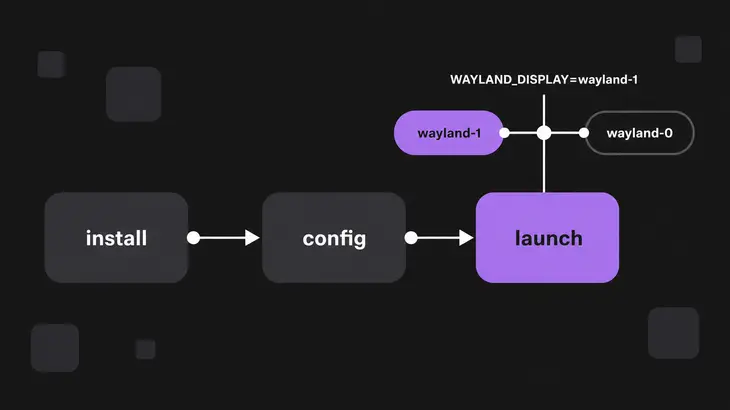
wayvnc finds the compositor through WAYLAND_DISPLAY. Sway sets that for everything it launches, so in a terminal on the Sway desktop:
echo $WAYLAND_DISPLAYCurrent Sway answers wayland-1; older versions use wayland-0. Over SSH the variable is empty, but the socket is a file in your runtime directory, and your SSH login gets the same $XDG_RUNTIME_DIR as your desktop session:
ls $XDG_RUNTIME_DIRThe wayland-1 in that listing is the name you hand to wayvnc.
Pick how you run it
- Helping someone, or a one-off: the single
ssh -t -L ...command in the tunnel section. Nothing listens before you connect or after you hit Ctrl+C. - Your own desk, reachable whenever you're logged in: start wayvnc from your Sway config, and come in through the tunnel.
- A LAN you trust: bind every interface, keep the login on, and open port 5900 to your subnet only.
- A box with no monitor: run Sway headless and start wayvnc on its socket.
Whichever you pick, the login and key come first.
Give it a login and an RSA-AES key
wayvnc reads one key=value per line from ~/.config/wayvnc/config. RSA-AES needs a key file next to it. Generate it once; wayvnc loads it at every start, so your viewer sees the same fingerprint each time:
mkdir -p ~/.config/wayvnc
ssh-keygen -m pem -f ~/.config/wayvnc/rsa_key.pem -t rsa -N ""
Then write the config. Put your own username and password in the two placeholder lines before you paste it. The password sits in the file in clear text: umask 077 makes a new file readable by you alone, and the chmod fixes one you created earlier. Running the block again replaces the whole file, including any TLS or address lines you added later:
(umask 077; cat > ~/.config/wayvnc/config <<'EOF'
use_relative_paths=true
enable_auth=true
username=<vnc-user>
password=<vnc-password>
rsa_private_key_file=rsa_key.pem
EOF
)
chmod 600 ~/.config/wayvnc/config
use_relative_paths=true makes rsa_key.pem resolve next to the config, so the RSA-AES setup needs nothing else. enable_auth=true needs a username and a password, and no certificate.
With the login on, wayvnc offers only encrypted security types: RSA-AES and RSA-AES-256, plus VeNCrypt once you add a certificate. There's nothing unencrypted on the list, which is why an old viewer can't get in.
Add TLS only for a viewer that lacks RSA-AES, such as TigerVNC older than 1.13. Once a certificate is set, wayvnc lists VeNCrypt first, and TigerVNC takes the first type the server lists that it supports. So every TigerVNC viewer, current ones included, switches to TLS and asks you to accept the certificate instead of showing the key fingerprint. Make the self-signed certificate for the name and address the server is reached by, plus localhost for the tunnel:
cd ~/.config/wayvnc
openssl req -x509 -newkey ec -pkeyopt ec_paramgen_curve:secp384r1 -sha384
    -days 3650 -noenc -keyout tls_key.pem -out tls_cert.pem
    -subj "/CN=<server-host>"
    -addext "subjectAltName=DNS:<server-host>,IP:<server-ip>,DNS:localhost,IP:127.0.0.1"
cd -
Then add both files to the config. wayvnc refuses a certificate without its key, so it's both lines or neither:
cat >> ~/.config/wayvnc/config <<'EOF'
private_key_file=tls_key.pem
certificate_file=tls_cert.pem
EOF
If remote typing drops symbols, add xkb_layout= with the layout nearest to your client's keyboard. Without it, wayvnc takes XKB_DEFAULT_LAYOUT or the system default.
Start it and check what's listening
In a terminal on the Sway desktop:
wayvnc -L infoIt stays in the foreground and logs Listening for connections on 127.0.0.1:5900. Use -L info rather than -v: in 0.9.1 the default log level overwrites -v, so -v shows you nothing extra.
From a second terminal:
ss -tln | grep 5900
wayvncctl version
ss shows a LISTEN line on 127.0.0.1:5900. wayvncctl talks to the running server over its control socket, $XDG_RUNTIME_DIR/wayvncctl, and answers with the wayvnc, neatvnc and aml versions, so you know which instance you're poking.
One thing to watch: a missing config file is not an error. If ~/.config/wayvnc/config isn't there, wayvnc starts without a login and offers no security at all; 0.9.1 only fails on a missing file you named with -C.
Connect through an SSH tunnel
127.0.0.1 means nothing off the box can reach the server, so on your client you carry port 5900 over SSH with -L. -N keeps the session open without a remote command, which means it holds the terminal:
sudo apt install tigervnc-viewer
ssh -N -L 5900:127.0.0.1:5900 <user>@<server-host>
In a second terminal on the client:
vncviewer localhost::5900The double colon means a port, not a display number. With the RSA-AES config above, TigerVNC first shows a Server key fingerprint box. It doesn't store your answer and asks on every connect, so check it against the one you saw last time. Then it asks for the username and password from your config. Back on the server, wayvncctl client-list now shows your viewer.
When wayvnc isn't running yet, one command from the client starts it on the remote session and opens the tunnel:
ssh -t -L 5900:127.0.0.1:5900 <user>@<server-host> WAYLAND_DISPLAY=wayland-1 wayvnc -L infoSwap wayland-1 for whatever ls $XDG_RUNTIME_DIR showed. -t gives wayvnc a terminal, so Ctrl+C in that window stops it and the tunnel closes with it. Connect the viewer from a second terminal as above.
RealVNC Viewer works through the same tunnel. wayvnc has offered RSA-AES, the method RealVNC Viewer uses, since 0.7.0.
Connect directly on your LAN
To skip the tunnel, have wayvnc bind every interface. Add the address to the config, then stop wayvnc and start it again:
echo 'address=0.0.0.0' >> ~/.config/wayvnc/configss -tln | grep 5900 now shows 0.0.0.0:5900. Keep enable_auth=true: without it, anyone who can reach the port gets your desktop, so never bind every interface on a public network or the internet without authentication.
If the host filters with ufw, open 5900 to your subnet only. ufw installs disabled, so a rule does nothing until ufw enable, and over SSH you allow SSH before you enable it or you cut off your own session:
sudo ufw allow ssh
sudo ufw allow from <lan-subnet> to any port 5900 proto tcp
sudo ufw enable
sudo ufw status
Then, from the client:
vncviewer <server-host>::5900Don't forward 5900 on your router. From outside, come in over the SSH tunnel or a VPN.
Stop it
In the terminal running wayvnc -L info, Ctrl+C stops it; you'll see Received termination signal. and the prompt comes back. From any other shell of yours, including an SSH login:
wayvncctl wayvnc-exit
ss -tln | grep 5900
wayvnc-exit drops every connected viewer and shuts the server down, so ss comes back empty. Your Sway session and your config are untouched.
Start it with Sway at every login
Sway runs exec lines from its config when it starts. A stock Debian 13 Sway has no config of yours and runs /etc/sway/config. Sway uses the first config it finds, so a ~/.config/sway/config holding only the wayvnc line would replace the stock one, keybindings and bar included. Copy the stock one first; --update=none leaves a config you already have alone:
mkdir -p ~/.config/sway
cp --update=none /etc/sway/config ~/.config/sway/config
Then add wayvnc to it and log in to Sway again:
echo 'exec wayvnc' >> ~/.config/sway/configCome in through the tunnel as before. wayvncctl wayvnc-exit turns it off until the next login.
Run it on a machine with no monitor
Sway can run on its headless backend with no screen or input devices. From an SSH login, set the two variables from the upstream FAQ and start it. Sway holds that terminal:
WLR_BACKENDS=headless WLR_LIBINPUT_NO_DEVICES=1 swayFrom a second SSH login, find the socket it made and start wayvnc on it:
ls $XDG_RUNTIME_DIR
WAYLAND_DISPLAY=wayland-1 wayvnc -L info
Use the name the listing shows. Sway takes the first free wayland-N from 1 up, so if your account already runs a Sway on the console, that one holds wayland-1 and the headless one gets wayland-2. Then tunnel in as above.
Other distributions and Raspberry Pi OS
The config, the commands and the checks carry over. What changes:
- Ubuntu 24.04:
sudo apt install wayvncgives you 0.7.2, which already has RSA-AES anduse_relative_paths. - Fedora 43:
sudo dnf install wayvncgives you 0.9.1, the same as Debian 13. - Arch Linux:
sudo pacman -S wayvncgives you 0.10.2, the current upstream release, and an/etc/pam.d/wayvncfile. - Raspberry Pi OS: wayvnc is already the Pi's built-in VNC server, and you turn it on with raspi-config, not with the steps here. The Pi's package runs
wayvnc.serviceunder thevncaccount and reads/etc/wayvnc/config, which setsaddress=::,enable_pam=trueand both TLS and RSA-AES keys. So it answers on every interface and checks logins through PAM. Its control socket lives at/tmp/wayvnc/wayvncctl.sock, so a plainwayvncctlwon't find it; usesudo wayvncctl --socket=/tmp/wayvnc/wayvncctl.sock version.
When it won't start or connect
| Error or symptom | Cause | Fix |
|---|---|---|
WAYLAND_DISPLAY is not set in the environment |
Started from SSH or a TTY | WAYLAND_DISPLAY=wayland-1 wayvnc -L info, with the name from ls $XDG_RUNTIME_DIR |
Failed to connect to WAYLAND_DISPLAY="wayland-1" |
Wrong socket name, or the compositor isn’t running | ls $XDG_RUNTIME_DIR and use the wayland-N it lists |
Virtual Pointer protocol not supported by compositor. |
GNOME, or another compositor without the virtual pointer protocol | Log in to Sway |
Authentication enabled, but missing password |
enable_auth=true without password= |
Add username= and password= to the config |
Need both certificate_file and private_key_file for TLS |
Only one TLS line in the config | Add the other line, or remove both |
Failed to listen on socket or bind to its address. Add -Ldebug to the argument list for more info. |
Port 5900 is taken, often by a wayvnc you already started | wayvncctl wayvnc-exit, or set another port= |
| Viewer connects without a password prompt | No config file, so wayvnc runs with no login | Create ~/.config/wayvnc/config, then restart wayvnc |
| New fingerprint every time wayvnc restarts | No rsa_private_key_file: wayvnc makes a key when the first RSA-AES viewer connects and logs An RSA key has not been set. A new key will be generated. |
Generate rsa_key.pem and add the line |
The choice that matters is where wayvnc listens, not which viewer you use. Keep it on loopback and let SSH do the reaching, and the VNC login becomes a second lock instead of the only one. If a start still fails in a way you can't place, rerun it with -L debug, the level wayvnc's own bind error points you to.
FAQs
Why does vncviewer say "Server did not offer supported security type"?
That message comes from xtightvncviewer, which only knows None and VncAuth, so it can't log in to wayvnc. Install tigervnc-viewer: Debian gives TigerVNC the higher priority for the vncviewer name, or you can run xtigervncviewer directly.
Which monitor does wayvnc share when there are two?
The first output, unless you start it with -o and the output's short name, such as DP-1. On a running server, wayvncctl output-list shows the outputs and which one is captured, and wayvncctl output-cycle moves to the next.
Can wayvnc listen on a Unix socket instead of a TCP port?
Yes. wayvnc -u <socket-path> treats the address as a path and creates a Unix domain socket there. Put it under your $XDG_RUNTIME_DIR, which only your user can open. SSH forwards a remote socket just like a port, ssh -N -L 5900:<socket-path> <user>@<server-host>, and the viewer still connects to localhost::5900.