For a desktop VM you actually work in, one that needs sound, USB redirection, a shared clipboard or more than one monitor, use SPICE, as long as your host still ships it. Use VNC for install and recovery consoles, headless servers, whatever VNC viewer you have to hand, and every VM on a RHEL 9 or RHEL 10 host. RHEL dropped SPICE, so VMs configured with SPICE or QXL fail to start there, and converting one to VNC costs it its audio and USB passthrough.
What you get on screen with each
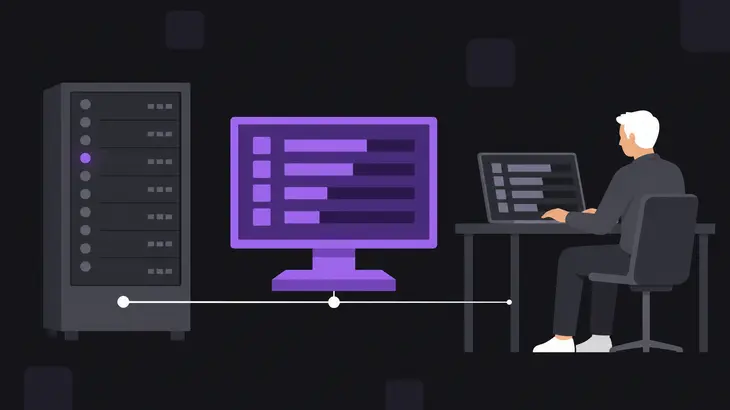
Either way, the console comes from QEMU on the host, not from anything you install in the guest. In the domain XML each one is a graphics device, type='vnc' or type='spice', and out of the box libvirt binds both to 127.0.0.1.
Open a VNC console and you get the guest's VGA display over a single RFB session from QEMU's VNC server. Any VNC viewer can open it. libvirt hands out ports from 5900 upward as consoles start, so the first VM on a host usually lands on display :0, port 5900.
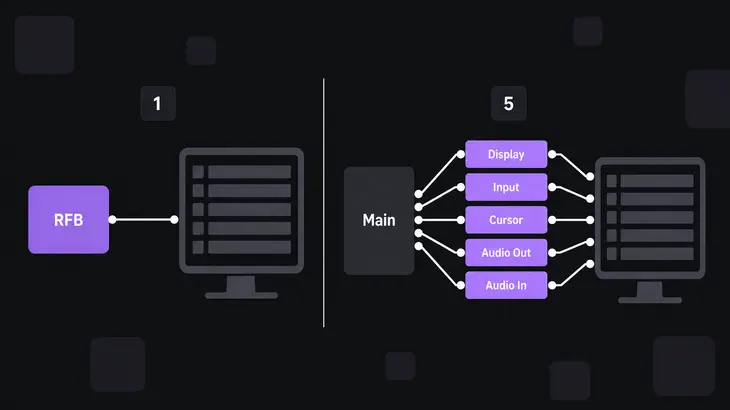
Open a SPICE console with remote-viewer or virt-viewer and you get more than a picture. SPICE runs the session as separate channels: main holds the session together, display and cursor carry the screen and pointer, inputs your keyboard and mouse, playback and record sound in each direction, and usbredir channels any USB device you redirect. Put the SPICE agent in the guest and it talks to the host over a virtio-serial port. That's what gives you a shared clipboard and a guest resolution that follows your window.
| VNC | SPICE | |
|---|---|---|
| Wire model | One RFB session carrying the guest display | Channels for session, display, cursor, input, audio playback, audio recording, USB |
| Listener | One TCP port, 5900 plus the display number | Plaintext port and encrypted tlsPort, set separately |
| Clients | Any VNC viewer, plus remote-viewer and virt-viewer |
remote-viewer and virt-viewer, or the HTML5 client behind websockify |
| Audio, USB, clipboard | QEMU can send audio to a client that asks for it; USB redirection and clipboard sharing are unsupported over VNC on RHEL 9 | Audio channels, USB redirection, clipboard and file transfer through the agent |
VNC isn't completely silent: QEMU's VNC server takes an audiodev= option for clients that request audio. Still, on RHEL 9 audio playback, USB redirection, clipboard sharing and drag-and-drop file transfer are unsupported or work poorly over VNC, so a VM that depends on them belongs on SPICE, on a host that still has it.
Find out what a VM uses, and move it to VNC on RHEL
On a RHEL 9 host, a VM that still uses SPICE or QXL fails to start with an unsupported configuration error, and RHEL 10 doesn't support SPICE at all, so on both releases the fix is to convert the VM. Fedora and Ubuntu 24.04 still package it, as qemu-ui-spice-core and qemu-system-modules-spice, so SPICE keeps working there.
Start by checking the VM's graphics device:
virsh dumpxml --xpath //graphics <vm>With --xpath you get just the matching element, such as <graphics type='spice' ...> on a VM that still needs converting. The option arrived in libvirt 8.5.0, so on an older host, such as Ubuntu 22.04, which ships 8.0.0, run virsh dumpxml <vm> | grep '<graphics' instead.
Shut the VM down, then switch it to VNC:
virsh shutdown <vm>
virt-xml <vm> --edit --convert-to-vnc
virsh shutdown only asks the guest to power off. It comes back straight away with Domain '<vm>' is being shutdown, and there's no guarantee the guest goes along with it, so wait until virsh domstate <vm> prints shut off. virt-xml answers Domain '<vm>' defined successfully. If it adds Changes will take effect after the domain is fully powered off., the guest was still running and the change waits for its next cold start. --convert-to-vnc arrived in virt-manager 5.0.0, so check virt-xml --version on an older host.
The conversion replaces qxl video devices, removes every spicevmc and spiceport device and turns SPICE GL into egl-headless; the removed devices carry the audio and USB passthrough, which VNC has no suitable replacement for. Add the qemu-vdagent=on sub-option and you get a qemu-vdagent device that takes over some of the SPICE agent's work:
virt-xml <vm> --edit --convert-to-vnc qemu-vdagent=onRun the virsh dumpxml --xpath //graphics <vm> line again and you'll see type='vnc'.
Set up VNC on a VM
In libvirt domain XML
Open the VM with virsh edit <vm> and set the graphics device. autoport lets libvirt pick the port, and listen pins the address:
<graphics type='vnc' autoport='yes'>
  <listen type='address' address='127.0.0.1'/>
</graphics>
Start the VM and ask libvirt where its console is:
virsh start <vm>
virsh domdisplay <vm>
virsh start answers Domain '<vm>' started. virsh domdisplay then prints something like vnc://127.0.0.1:0, and that :0 is a display number, because libvirt takes 5900 off the port in a VNC URI. remote-viewer reads the number in a vnc:// URI as the TCP port, so for remote-viewer the same console is vnc://127.0.0.1:5900.
Directly in QEMU
-vnc takes host:d, and the TCP port is 5900 plus d. Leave host out and QEMU accepts connections from any host, so bind it to loopback, and add a USB tablet while you're at it: it reports absolute pointer coordinates, so the guest pointer follows your mouse without a grab.
qemu-system-x86_64 <other-options> -vnc 127.0.0.1:0 -device usb-tabletThat console listens on 127.0.0.1, port 5900.
Set up SPICE on a VM
In libvirt domain XML
On a host that still ships SPICE, open the VM with virsh edit <vm>, then add a SPICE graphics device and a QXL video card, plus the virtio-serial controller and the spicevmc channel the agent talks over:
<graphics type='spice' autoport='yes'>
  <listen type='address' address='127.0.0.1'/>
</graphics>
<video><model type='qxl'/></video>
<controller type='virtio-serial' index='0'/>
<channel type='spicevmc'>
  <target type='virtio' name='com.redhat.spice.0'/>
</channel>
In the guest, install the agent (spice-vdagent on Linux) or the clipboard and resizing do nothing, and add the QXL driver if you want more than one monitor. journalctl -t spice-vdagentd -t spice-vdagent inside the guest shows you whether the agent came up. Start the VM with virsh start <vm> and run virsh domdisplay <vm> as for VNC. This time you get a spice:// URI with the real port in it, spice://127.0.0.1:5900 for example, and remote-viewer takes it as it is.
USB redirection
USB redirection needs a USB2 EHCI controller plus its UHCI companions, and one redirdev line for each client USB device you want redirected at the same time:
<controller type='usb' index='0' model='ich9-ehci1'/>
<controller type='usb' index='0' model='ich9-uhci1'>
  <master startport='0'/>
</controller>
<controller type='usb' index='0' model='ich9-uhci2'>
  <master startport='2'/>
</controller>
<controller type='usb' index='0' model='ich9-uhci3'>
  <master startport='4'/>
</controller>
<redirdev bus='usb' type='spicevmc'/>
Directly in QEMU
-spice keeps plaintext and encrypted listeners apart: port serves the plaintext channels, tls-port the encrypted ones, and addr defaults to any address, so set it. Give it both ports and the client picks TLS or plaintext for every channel you haven't forced with tls-channel=, so for an encrypted console set tls-port alone and QEMU opens no plaintext listener:
qemu-system-x86_64 <other-options> -vga qxl -spice addr=127.0.0.1,tls-port=5901,x509-dir=<cert-dir>,sasl=onsasl=on reads its methods from /etc/sasl2/qemu.conf. Only some SASL methods, GSSAPI for one, also encrypt the data, so keep tls-port and x509-dir on the same line.
Reach the console from another machine
The loopback default comes from vnc_listen and spice_listen in /etc/libvirt/qemu.conf, which both default to 127.0.0.1, so a viewer on another machine can't reach either console directly. Only open them up once you've enabled vnc_tls or spice_tls with a CA and a server certificate in place. Day to day, leave them on loopback and come in over SSH.
If your workstation can reach libvirt over SSH, let virt-viewer do the work:
virt-viewer --connect qemu+ssh://<user>@<kvm-host>/system <vm>virt-viewer finds the guest over the libvirt connection and tunnels the console through SSH; --direct turns that tunnel off. For SPICE, load your key into ssh-agent first, or the tunnel asks you to authenticate several times.
For a VM under bare QEMU, or when all you have is plain SSH to the host, forward the port yourself. Read the console port on the host from virsh dumpxml --xpath //graphics <vm> (for the first VM it shows port='5900' autoport='yes' listen='127.0.0.1'), then open an ssh -L forward to it:
ssh -L 5900:localhost:5900 <user>@<kvm-host>Keep that session open and point remote-viewer at the local end from a second terminal:
remote-viewer vnc://localhost:5900Use spice://localhost:5900 for a SPICE console. Pick a different local port in ssh -L and the URI has to use that port too.
For consoles you only ever open on the host itself, libvirt also offers <listen type='socket'/> and <listen type='none'/> for both VNC and SPICE, and neither creates a TCP listener at all.
Before you move a host to RHEL 9 or RHEL 10, find every VM on it that still uses SPICE: for vm in $(virsh list --all --name); do echo "$vm"; virsh dumpxml "$vm" | grep '<graphics'; done. The grep form also runs on libvirt older than 8.5.0, which has no --xpath. Convert each one that prints type='spice' while you still have a host it boots on.
FAQs
What port does a VM's VNC or SPICE console use?
libvirt starts at 5900 and counts up for each console it starts, skipping ports already in use, so the first VM usually gets 5900. For the real value, run virsh dumpxml --xpath //graphics <vm> against the running VM and read its port attribute. Don't read it off virsh domdisplay for VNC: that URI shows the display number, not the port.
Can I open the VM console in a browser?
For VNC, yes. Give the graphics device a websocket port, as in <graphics type='vnc' autoport='yes' websocket='-1'>, where -1 lets libvirt pick one, and QEMU opens a second listener that noVNC connects to without websockify. Without TLS credentials that WebSocket listener runs unencrypted, so keep it on loopback and reach it over SSH like the console itself. SPICE has no WebSocket support of its own: its HTML5 client needs websockify in front and has no audio or agent support, which gives up most of the reason to pick SPICE.