Your VNC server has blacklisted the address you're connecting from. TigerVNC and RealVNC Server both send this exact text, and both block an address for 10 seconds at first, doubling every time it gets back in and fails again, so retrying is what keeps you out. On TigerVNC, five connections from one address that don't log in are enough, and the block lands before your viewer gets as far as a password prompt.
There are three ways back in. Stop everything that's retrying and make one careful attempt once the block runs out. Restart the server, which empties the list at once but on TigerVNC also ends the desktop session. Or, when the server takes connections on another address you can reach, come in from one that isn't blocked. Then read the session log to see what made those connections, because a wrong password is only one of the things that count.
What the server does when it sends this
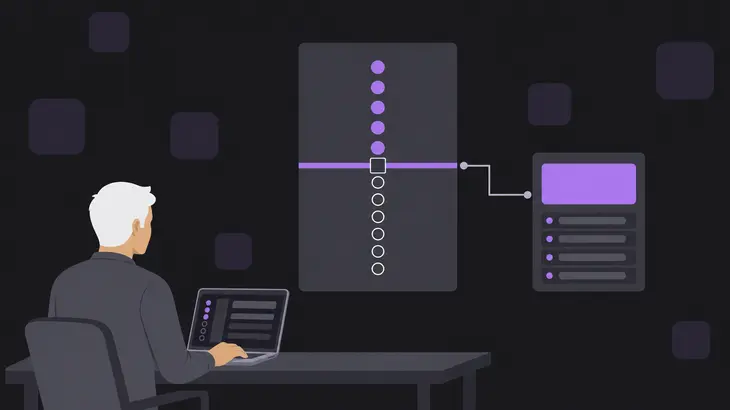
TigerVNC keeps its blacklist in the server process's memory, keyed on the client's IP address. Every connection the server accepts puts a mark against that address, and only a successful login wipes the address's marks. Once an address is blocked, the server answers its next connection with an RFB 3.3 failure carrying the reason Too many security failures, then hangs up. That happens before any security type is agreed, which is why you never see a password prompt. TigerVNC Viewer 1.15 reports it as Failed to authenticate with the server. Reason given by the server: with Too many security failures underneath, and older viewers word the dialog differently but end with the same reason.
Three Xtigervnc parameters run the scheme, and x0vncserver (X0tigervnc on Debian) takes the same three with the same defaults:
| Parameter | Default | What it controls |
|---|---|---|
BlacklistThreshold |
5 | Unauthenticated connections allowed from one address before it’s blocked |
BlacklistTimeout |
10 | Seconds of the first block |
UseBlacklist |
on | Whether blocking happens at all |
The count belongs to the address, not to a user. Five connections pass, the fifth starts the 10-second block, and a sixth inside that window gets the error.
What counts toward the block
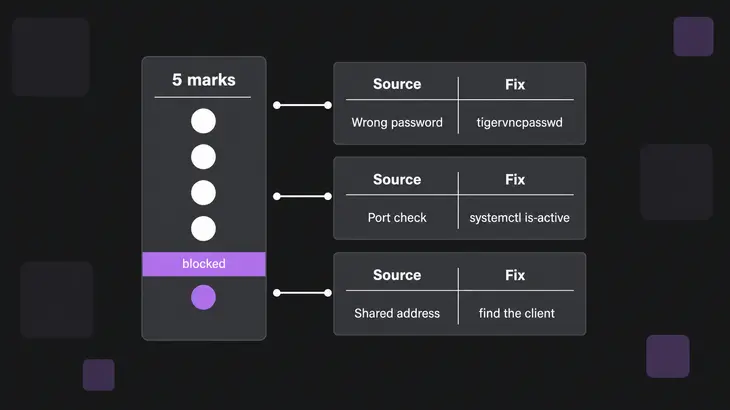
The threshold counts unauthenticated connections, not wrong passwords. A port check against 5901 adds a mark, so does a scanner, and so does a viewer you closed at the password prompt. The session log on the Debian 13 worked run below tells them apart:
| What tripped it | What the session log shows |
|---|---|
| The wrong password, tried again and again | Accepted: from your address, then Authentication error: Authentication failed and Closing <peer>: Authentication failed |
A monitoring check, nc -vz or a scanner |
Many Accepted: and Closing <peer>: Clean disconnection pairs from one address in quick succession, with no authentication line between; a probe that sends something other than an RFB greeting logs Closing <peer>: Reading version failed, not an RFB client? |
| Several people behind one address | Accepted: and Authentication error lines from one NAT address, or from loopback (127.0.0.1 or [::1]) when everyone tunnels in over SSH |
| Someone outside guessing passwords | Accepted:, Authentication error and finally Blacklisted: lines for an address you don’t recognise |
The tunnel row catches people out. ssh -L makes the connection to the VNC port from the server machine itself, so the server sees every tunnelled user as loopback. The default listener takes both 127.0.0.1 and [::1], and the server keeps one count per address, so tunnelled users share at most two counts. Debian's default listener only takes loopback connections, so there that's every remote user you have, and one person's typos can lock out the rest.
Read the session log first
The worked run is Debian 13 with TigerVNC 1.15 on display :1, port 5901, run by the tigervncserver@:1 service. The service starts the tigervncserver wrapper, which writes the session log to ~/.config/tigervnc/<host>:1.log in the session user's home, where <host> is the machine's full hostname. The default log level already records connections, blocks and failed logins, so you don't need to turn anything up. As the session user:
grep -E 'Accepted|Closing|Blacklisted|Authentication error|password file' ~/.config/tigervnc/*:1.logA line reading Connections: Blacklisted: <your-address> confirms the block. The lines above it tell you what led there, matched against the table: Authentication error lines mean wrong passwords, while a run of Closing <peer>: Clean disconnection lines from one address with no authentication line between them points at a check or a scan. One such line on its own can just be a normal logout, because a successful login prints nothing this grep matches.
To see which address made the connections, count them:
grep -hoE '(Accepted|Blacklisted): [^ ]+' ~/.config/tigervnc/*:1.log | sed 's/::[0-9]*$//' | sort | uniq -c | sort -rnEach output line is a count, the event and an address, busiest first. The sed strips the port the server logs after :: on each Accepted: line, so connections from one address add up instead of splitting by port. An IPv6 peer is logged in brackets, [::1]::<port>, and the same sed leaves [::1].
Get back in: wait, restart or switch address
Switching address costs nothing when it's open to you, so check that first. Otherwise pick by what's running in the session: if the apps on it matter more than the wait, wait, and if you need in now and can lose the session, restart.
Wait it out. Stop everything that's trying: viewers left on retry, scripts with a stale password, the monitoring check. When a block runs out, the server lets one connection through and at the same moment arms the next block at double the length. If that connection fails too, you're looking at 20 seconds, then 40, then 80. Ten failed tries after the first block and you're at 10,240 seconds, close to three hours, which is how a forgotten script keeps an address locked all afternoon. Once everything is quiet and the block has run out, connect once, the way you normally come in. On the default Debian listener, which only takes loopback connections, that's through SSH:
xtigervncviewer -via <user>@<server-host> localhost:1-via opens the SSH tunnel for you, and localhost means the server end of it. A direct xtigervncviewer <server-host>:1 only reaches the server when it listens on the network: you set $localhost = "no";, or set TLS, X509 or RA2 security types with no *None type and left $localhost unset. Either way you get the password prompt this time, and logging in clears your address's marks.
Restart the server. That empties the list at once, and nothing else can on a running server. Xtigervnc is the X server for the session, so a restart closes the desktop and every application on it:
sudo systemctl restart tigervncserver@:1.service
systemctl status tigervncserver@:1.service
Look for Active: active (running) before you connect. For a session you started by hand instead of through the service:
tigervncserver -kill :1
tigervncserver :1
Switch address. If the server listens on the network (see the direct-connect condition above) and it's your LAN address that's blocked, use the -via command from the wait step: the tunnel reaches the server from loopback, which has its own count.
If you already come in over SSH, read the Blacklisted: line to see which loopback address is blocked, then forward to the other one explicitly. Your machine may resolve localhost either way, so name the address. For a blocked [::1], forward to 127.0.0.1:
ssh -L 5901:127.0.0.1:5901 <user>@<server-host>For a blocked 127.0.0.1, forward to [::1]. ssh wants the IPv6 address in brackets, and the quotes keep your shell from reading them as a pattern:
ssh -L '5901:[::1]:5901' <user>@<server-host>That ssh session holds the tunnel, so keep it open and connect through it from another terminal:
xtigervncviewer localhost::5901Fix what tripped it
A wrong password. Run tigervncpasswd as the session user. On Debian 13 it takes six to eight characters and refuses anything longer. Xtigervnc reads the password file on every incoming connection, so the new one works on your next try without a restart. Debian's build also keeps a copy of the last password it read, and only falls back to that copy when the file can't be read.
That fallback has its own symptom. If the file at the default location, ~/.config/tigervnc/passwd, disappears or becomes unreadable while the session runs, every login attempt logs Opening password file '<path>' failed, and logins keep working with the last password the server read. Run tigervncpasswd again to put the file back. A file missing at start doesn't get this far: the wrapper won't start the server without one.
A monitoring check. Have it ask systemd whether the unit runs instead of opening port 5901, since every probe of the port is a mark against the checker's address:
systemctl is-active tigervncserver@:1.serviceIt prints active while the session is up.
Someone outside. Blocks on an address you don't recognise mean the VNC port is reachable from a network you don't control. Add $localhost = "yes"; to /etc/tigervnc/vncserver-config-mandatory so no user file or security-type setting can open it again, restart the unit, and give remote users SSH logins. The list then only ever holds your own users' addresses.
Change the threshold and timeout
The Debian wrapper reads $BlacklistThreshold, $BlacklistTimeout and $UseBlacklist from ~/.config/tigervnc/config.pl or /etc/tigervnc/vncserver-config-defaults and passes them to Xtigervnc. A line in /etc/tigervnc/vncserver-config-mandatory beats both. To let an address make 20 connections before it's blocked:
$BlacklistThreshold = 20;Leave UseBlacklist on for any listener other machines can reach. With it off, the only brake on password guessing is the 100 ms delay TigerVNC adds before each failed-login reply. The wrapper reads these files when the server starts, so the change needs the restart from above, and that ends the session.
What changes on Ubuntu 24.04, upstream TigerVNC and RealVNC Server
Ubuntu 24.04
It ships TigerVNC 1.13.1, which keeps everything in ~/.vnc/ and logs its connection lines in lower case (accepted:, closing, blacklisted:). A wrong password shows up as SConnection: AuthFailureException: Authentication failure, not Authentication error, so grep for that:
grep -iE 'accepted|closing|blacklisted|AuthFailureException|password file' ~/.vnc/*:1.logFor the per-address count, swap the first grep for grep -hoiE '(accepted|blacklisted): [^ ]+' ~/.vnc/*:1.log. The $BlacklistThreshold and $BlacklistTimeout lines go in ~/.vnc/tigervnc.conf, which the 1.13.1 wrapper passes to Xtigervnc the same way. The unit is the same tigervncserver@:1.service.
Fedora, RHEL and other upstream builds
Builds that run upstream's vncsession 1.14 or later use the vncserver@:1 unit and the vncpasswd tool, and write the log to ~/.local/state/tigervnc/<host>:1.log. Settings go in ~/.config/tigervnc/config as one option=value line each, for example BlacklistThreshold=20.
RealVNC Server
RealVNC Server sends the same text and follows the same scheme: it blocks an IP address after five unsuccessful connection attempts, for 10 seconds at first, doubling with each further failure. Waiting, a successful connection from that address, or a restart of RealVNC Server clears it. The two settings are the BlacklistThreshold and BlacklistTimeout parameters, defaulting to 5 and 10 seconds, and a threshold of 0 allows unlimited attempts. On Linux in Service Mode, stop and start the service:
sudo systemctl stop vncserver-x11-serviced.service
sudo systemctl start vncserver-x11-serviced.service
The setting worth deciding is whether one client may lock everyone else out. On a loopback listener behind SSH it can, since tunnelled users share the loopback counts, so raise $BlacklistThreshold to fit your team. On a listener the network can reach, keep the threshold at 5 or lower, lengthen $BlacklistTimeout, and read every Blacklisted: line.
FAQs
What does “Too many authentication failures” mean instead?
That's the TightVNC 1.3 server, which Debian still ships as tightvncserver. Its lock is global, not per address: after five failed passwords from anyone, it turns away every client, first for 10 seconds and doubling with each failure past the fifth. Its log line reads Too many authentication failures - client rejected. One user's typos lock out everybody, so on that server, find the failing client before you blame the network.
Why can't tigervncconfig reset the blacklist on a running server?
tigervncconfig -set only changes the parameters named in -AllowOverride, and the default list (desktop, AcceptPointerEvents, SendCutText, AcceptCutText, SendPrimary, SetPrimary) leaves out all three blacklist parameters. Adding them means restarting Xtigervnc with a new -AllowOverride, and that restart has already emptied the list.