For most admins the VNC client is TigerVNC's vncviewer: one native viewer on Linux, Windows and macOS that you can script, pin to a security type and push through SSH. Take Remmina instead when VNC is one protocol among RDP and SSH on a Linux desktop, TightVNC or UltraVNC when you support Windows machines and run the server on them too, noVNC when the user only has a browser, and RealVNC Viewer when your servers run RealVNC Server.
Any of them reaches a standard VNC server, because they all speak RFB. Where they differ in practice is security. The server offers a list of security types and the viewer picks one, so check that your viewer handles the type your server is set to before you standardise on it.
How the viewer and server settle on security
The viewer opens a TCP connection to the server, which listens on 5900 plus the display number, so display :1 is port 5901. The two agree on an RFB version, then the server sends the security types it accepts and the viewer picks one from that list. On RFB 3.3 there's no choice: the server names the one type itself. What you end up with is decided by that list, not by the viewer.
With TigerVNC on both ends, that plays out like this. Xvnc offers TLSVnc,VncAuth unless you change its -SecurityTypes, though Debian's and Ubuntu's tigervncserver wrapper starts it with VncAuth alone unless you pass -localhost no. The viewer attempts every scheme it supports by default, so it will happily take None if that's all a server offers. Plain VNC Authentication isn't much better: the password is truncated to eight characters. Pin the type on the viewer, as in the worked run below, and keep VncAuth inside SSH.
noVNC adds a leg. It speaks the same RFB but needs WebSockets, so unless the VNC server has WebSocket support built in, websockify sits in the middle: browser to proxy over WebSocket, proxy to the VNC server over plain TCP. wss:// only encrypts the browser leg and does nothing for the proxy-to-server leg, so keep the proxy on the VNC host and point it at localhost.
The clients side by side
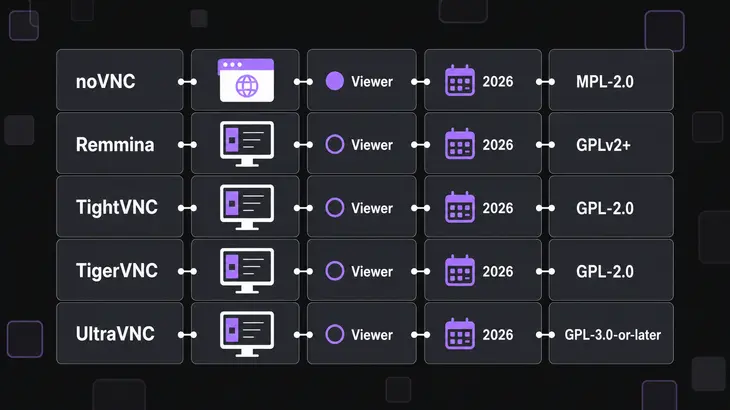
| Option | Viewer runs on | Best fit | Latest release | License |
|---|---|---|---|---|
| TigerVNC | Linux, Windows, macOS (a universal Mac binary) | Native viewer you can script: -via (not in the Windows build), -SecurityTypes, -X509CA |
1.16.2, March 26, 2026, a security fix for x0vncserver, so it matters on the hosts you share from |
GPL v2 |
| Remmina | Linux (GTK) | One client for VNC, RDP, SPICE, X2Go and SSH | v1.4.43, tagged February 20, 2026 | GPLv2+ |
| TightVNC | Windows XP and later | Windows viewer and server, one vendor for both ends | 2.8.88, June 19, 2026, with crash, hang and memory-safety fixes in Server and Viewer | GPL v2, which can’t be mixed into closed-source products, or a commercial source-code license for that case |
| UltraVNC | Windows 7 to 11, Server 2008 R2 to 2025 | Help-desk support of Windows machines | 1.8.3.0, the current download | GPL-3.0-or-later |
| RealVNC Viewer | Windows, macOS, Linux, iOS, Android | Fleets running RealVNC Server, including cloud connections; other VNC servers need 8.4.0 or later | Connect Viewer 8.5.0, August 2026 | Proprietary |
| noVNC | Any modern browser, iOS and Android included | Access with nothing installed on the user’s machine | 1.7.0, the latest tagged release | Core MPL-2.0, HTML and CSS 2-Clause BSD, so check which files you modify if you embed it |
If the viewer has to run on a Mac, TigerVNC and RealVNC Viewer both ship one. On a phone or tablet, RealVNC Viewer and noVNC in the browser are common choices, and when users can't install anything at all, noVNC needs nothing on their side.
Matching the client to the job

| Scenario | Pick | Deciding condition |
|---|---|---|
| Linux desktop with RDP, SSH and VNC hosts | Remmina | You want every protocol in one client |
| Linux, Windows or Mac, VNC only | TigerVNC | You want one native viewer you can script |
| Supporting Windows desktops | UltraVNC or TightVNC | You also run the server on the machines you support |
| Users with only a browser | noVNC | You can run websockify on or next to the VNC host |
| Servers running RealVNC Server | RealVNC Viewer | You want its encrypted and cloud connections. Other servers need a paid plan and a signed-in account, and those connections are unencrypted, so tunnel them |
Remmina keeps each connection as a .remmina profile under $XDG_DATA_HOME/remmina, and its VNC support comes from the separate remmina-plugin-vnc package, so install both. If you only need VNC, or want to script connections, TigerVNC's viewer takes the security type, CA file and SSH gateway as command-line options.
TightVNC and UltraVNC both put a viewer and a server on the Windows machine. UltraVNC is the help-desk tool of the two, and its viewer reaches other VNC servers too. If you only want a viewer on Windows, TigerVNC's installer keeps you on one client across Linux and Windows.
noVNC moves the cost to the server: you run websockify next to the VNC server and you own its TLS certificate.
A first connection with TigerVNC
The worked run uses a VNC server on display :1 (port 5901) on <server-host>, reached as <user>, from a Debian or Ubuntu machine:
sudo apt install tigervnc-viewer
vncviewer <server-host>:1
The package installs the binary as xtigervncviewer and registers vncviewer as an alternative, so either name works. After a single colon, TigerVNC reads a value under 100 as a display and anything from 100 up as a port, so :1 and :5901 land on the same server. Two colons always mean a port, vncviewer <server-host>::5901, and that's the form to put in scripts. Once the server answers you get a password prompt, then the remote desktop in a window. Start the viewer with no address and it asks which server to connect to instead. F8 opens the viewer's menu, and that's also where you quit.
That direct connection only works when the server listens on the network and its firewall passes 5901. Otherwise let the viewer build an SSH tunnel itself:
vncviewer -via <user>@<server-host> localhost:1-via runs ssh -f -L for you: you answer ssh's passphrase or password prompt in the terminal, and only then does the VNC password dialog come up. The address after the gateway is resolved on the gateway, so localhost here means <server-host>, not your machine. The same tunnel by hand:
ssh -L 5901:localhost:5901 <user>@<server-host>
vncviewer localhost:1
Don't paste those two lines into one terminal. The first logs you into a normal shell on the server and holds the forward open for as long as that shell lives, so run vncviewer localhost:1 from a second terminal on your own machine.
To stop the viewer from falling back to a weaker scheme, pin the security type and hand it the CA that signed the server's certificate. The server has to offer X509Vnc with its -X509Cert and -X509Key set. If it doesn't, the viewer has no scheme left to try and the connection fails, which is what you want:
vncviewer -SecurityTypes X509Vnc -X509CA <ca-cert.pem> <server-host>:1On Fedora the viewer is the tigervnc package, installed with sudo dnf install tigervnc. It puts vncviewer itself in /usr/bin, so every command after the install line is the same. Fedora ships 1.16, though, where Ctrl+Alt+M replaced F8 as the menu key.
Remmina and noVNC first runs
Remmina on Debian or Ubuntu, with a quick connect from a vnc:// URI:
sudo apt install remmina remmina-plugin-vnc
remmina -c vnc://<user>@<server-host>:5901
Leave the port off and Remmina dials 5900. Its VNC plugin adds 5900 to any port under 100, so <server-host>:1 in the server field reaches the same 5901. -c takes either a URI or a profile file, so the same flag opens a saved .remmina profile later.
For noVNC, run the proxy on the VNC host and bind it to localhost so the web client isn't exposed. The novnc_proxy script downloads and starts websockify for you:
git clone https://github.com/novnc/noVNC.git
cd noVNC
./utils/novnc_proxy --vnc localhost:5901 --listen localhost:6081
It prints a URL to cut and paste. From your workstation, forward the port with ssh -L 6081:localhost:6081 <user>@<server-host>, open that URL on your side, click Connect and enter the VNC password. Ctrl+C in the proxy's terminal stops it. To serve wss://, websockify loads self.pem by default, and --cert and --key point it at other files.
Before you roll it out
Point the worked connection at your real server and look for these:
- The viewer connects with no encryption when you expected TLS. The server's list still holds
NoneorVncAuth. Xvnc always sends its TLS and X509 types first and TigerVNC's viewer takes the first one it supports, but a viewer without VeNCrypt support takesVncAuthfrom the same list. Pin-SecurityTypes X509Vnc(orTLSVnc) on the viewer, and list only TLS or X509 types in the server's-SecurityTypes. - A long password works with only its first eight characters typed. You're on VNC Authentication, which truncates the key.
TLSVncandX509Vnccheck the same password file inside TLS, so they keep the limit. Tunnel it with-via, or move the server toTLSPlainorX509Plain, which check the user's system password through PAM instead. - noVNC loads but can't connect. The proxy points at the wrong port. Match
--vnc localhost:5901to the server's display (:1is 5901) and restartnovnc_proxy. - noVNC over
wss://fails with a self-signed certificate. Browsers don't prompt for a WebSocket with an untrusted certificate. Open the proxy'shttps://URL once, accept the certificate there, then reconnect.
If you haven't settled on anything yet, put TigerVNC's vncviewer on your own machine first and run the -via connection above against one real server, pinned with -SecurityTypes. Add a second client only when a row in the scenario table asks for one.
FAQs
Is there a VNC client I can script from a shell, with no desktop on my side?
Yes. vncdotool's vncdo drives a VNC server from the command line and opens no window. Install it with pipx install vncdotool (sudo apt install pipx first on Ubuntu), then vncdo -s <server-host>::5901 capture screen.png saves the remote screen as a PNG, and type and key send input. It prompts for the VNC password on the terminal. Reach for it to automate a VM console or an appliance; a person at a desktop still wants a viewer.
Does GNOME have its own VNC client?
Yes, Connections, and it speaks VNC and RDP. Install it with sudo apt install gnome-connections, and it covers the occasional connection from a GNOME desktop. Remmina adds SPICE, X2Go and SSH, and for scripted connections or a pinned security type TigerVNC's command-line options are still the tool.
Can I prefill a noVNC connection through a URL?
Yes. vnc.html reads settings from the query string or the fragment, and the fragment never goes to the server. host, port and encrypt still work but are deprecated in favour of a single path setting that holds the WebSocket URL.