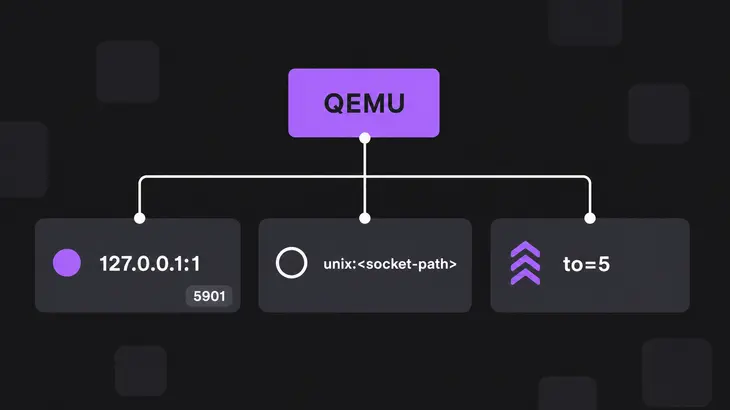
Put -vnc 127.0.0.1:1 on the QEMU command line and QEMU serves the guest's screen on the host's loopback, port 5901: display 1 plus 5900. From your workstation, tunnel it with ssh -N -L 5901:127.0.0.1:5901 <user>@<kvm-host> and open localhost:1 in a VNC viewer. If libvirt runs the VM, skip the tunnel setup: virt-viewer --connect qemu+ssh://<user>@<kvm-host>/system <vm> finds the console and tunnels it for you.
Use virt-viewer for anything libvirt manages, and bare -vnc with your own tunnel for a VM you start by hand. Give the console a LAN address only on a network you trust, and only with a password, because VNC doesn't protect the data stream unless you add TLS.
How the console gets to your viewer
QEMU runs the VNC server itself, so nothing gets installed in the guest. -vnc sends the guest's VGA display over VNC, bound to the address in front of the display number. Leave the address out, as in -vnc :1, and QEMU accepts connections from any host: on Ubuntu 24.04 that's 0.0.0.0:5901 and [::]:5901.
libvirt drives the same server from a <graphics type='vnc'> device and binds it to 127.0.0.1 on the first free port from 5900.
| How the VM runs | Where the console listens | How you reach it |
|---|---|---|
You start QEMU with -vnc 127.0.0.1:1 |
127.0.0.1:5901 on the host | ssh -L tunnel, then vncviewer localhost:1 |
You start QEMU with -vnc <host-ip>:1,password=on |
<host-ip>:5901 |
vncviewer <kvm-host>:1, once the firewall lets 5901 in |
libvirt runs it with <graphics type='vnc'> |
127.0.0.1, port 5900 and up | virt-viewer --connect qemu+ssh://<user>@<kvm-host>/system <vm> |
Watch the viewer address: TigerVNC's vncviewer reads host:1 as display 1 and host::5901 as TCP port 5901. The commands below use the display form.
Start QEMU with a VNC console
The commands are for Ubuntu 24.04, which ships QEMU 8.2; RHEL 9 and Fedora get their own section further down. Install QEMU on the host, then start the VM with your usual disk, memory and accelerator options in place of <vm-options>:
sudo apt install qemu-system-x86qemu-system-x86_64 <vm-options> -device qemu-xhci -device usb-tablet -vnc 127.0.0.1:1 -monitor stdio-vnc 127.0.0.1:1keeps the console on loopback, so only processes on the host reach it.-device usb-tabletgives the guest an absolute pointer, so its cursor follows your mouse without a grab. It needs a USB controller: without-device qemu-xhci(or one in<vm-options>), the defaultpcmachine stops withNo 'usb-bus' bus found for device 'usb-tablet'.-monitor stdiogives you a(qemu)prompt in this terminal. Otherwise the monitor defaults to a virtual console in the display, where anyone on the VNC session reaches it with Ctrl+Alt+2.
QEMU now holds that terminal. Check the listener from a second one:
sudo ss -tlnp | grep 5901You want 127.0.0.1:5901 held by qemu-system-x86. At the (qemu) prompt, info vnc answers Server: 127.0.0.1:5901 (ipv4) and Auth: none (Sub: none). If 5901 is taken, QEMU exits with Failed to find an available port: Address already in use; append ,to=5 to the -vnc value and it tries the displays up to :5 and prints the one it took, such as VNC server running on 127.0.0.1:5902.
Connect from your workstation through SSH
Install the viewer (tigervnc-viewer on Ubuntu gives you vncviewer) and open the tunnel:
sudo apt install tigervnc-viewerssh -N -L 5901:127.0.0.1:5901 <user>@<kvm-host>-L makes the onward connection from the KVM host, so 127.0.0.1:5901 is QEMU's loopback listener, and -N leaves the terminal holding the tunnel with no shell. Connect from a second terminal:
vncviewer localhost:1If 5901 is taken on your workstation, forward -L 5911:127.0.0.1:5901 and connect to localhost::5911.
Add a password
Each change from here is a new QEMU start, so shut the running one down first. system_powerdown at its (qemu) prompt only asks the guest to power off, and a guest still in firmware or an installer may ignore it. QEMU is gone when your shell prompt comes back; if the (qemu) prompt is still there, type quit. Until then it holds 5901, and a second QEMU on the same disk image stops with Failed to get "write" lock. Then:
qemu-system-x86_64 <vm-options> -device qemu-xhci -device usb-tablet -vnc 127.0.0.1:1,password=on -monitor stdiopassword=on turns on VNC authentication, but there's no password until you set one, and until then every login fails with Authentication failed. At the (qemu) prompt:
change vnc passwordQEMU prompts with Password: and echoes asterisks, so the password stays out of your scrollback. Only the first 8 characters count. The viewer now asks for the password. info vnc has shown Auth: vnc (Sub: none) since the start, set password or not.
For a scripted start, replace password=on with password-secret=<secret-id> plus -object secret,id=<secret-id>,file=<password-file>; set both and QEMU refuses with 'password' flag is redundant with 'password-secret'. To lock the console without stopping the VM, run expire_password vnc now: new logins fail, and a connected viewer keeps its session.
Open the console to other machines
Shut the running instance down as above, then start it on a host address with the password on, and set the password as before:
qemu-system-x86_64 <vm-options> -device qemu-xhci -device usb-tablet -vnc <host-ip>:1,password=on -monitor stdio-vnc :1,password=on would bind every IPv4 and IPv6 address instead. Ubuntu installs ufw disabled, so nothing blocks 5901 until you turn the firewall on. If your host runs ufw, let in only your viewers' network, then connect straight to the host:
sudo ufw allow proto tcp from <subnet> to any port 5901vncviewer <kvm-host>:1Keep this route to a LAN you trust; anywhere else, use the SSH tunnel or add TLS.
Add TLS to the direct route
QEMU reads ca-cert.pem, server-cert.pem and server-key.pem from one directory. The certtool steps for making them write the server key and certificate under per-host names, so rename those two to server-key.pem and server-cert.pem. Shut the running instance down as above and start it with the directory loaded as an object:
qemu-system-x86_64 <vm-options> -device qemu-xhci -device usb-tablet -monitor stdio -object tls-creds-x509,id=tls0,dir=<cert-dir>,endpoint=server,verify-peer=off -vnc <host-ip>:1,tls-creds=tls0,password=onWith credentials attached, QEMU offers only VeNCrypt on that port, so no viewer gets in without TLS, and info vnc shows Auth: vencrypt (Sub: x509-vnc). Keep verify-peer=off unless every viewer has its own certificate. The default demands a client certificate, and TigerVNC's viewer, which only takes a CA file, drops out with The TLS connection was non-properly terminated. Set the password, then point the viewer at the CA that signed the server certificate:
vncviewer -X509CA <ca-cert-file> <kvm-host>:1Use the libvirt console
Install QEMU, libvirt and virt-install, which comes in its own virtinst package:
sudo apt install qemu-kvm libvirt-daemon-system virtinstThen log out and back in, including on the account that ran the install. The package adds sudo-group members to the libvirt group and a login script sets LIBVIRT_DEFAULT_URI=qemu:///system, but neither reaches a shell that was already open: there virsh talks to your per-user qemu:///session, and VMs you create never show up for qemu+ssh://.../system. After the new login, virsh uri should print qemu:///system. Other admins need sudo adduser <user> libvirt and a new login too.
Give a new VM a VNC console:
virt-install --connect qemu:///system <install-options> --graphics vnc,listen=127.0.0.1For an existing VM, check its graphics device:
virsh dumpxml --xpath //graphics <vm>type='vnc' is ready. For type='spice', run virsh edit <vm> and make four changes, or the save fails:
- change
<graphics type='spice'totype='vnc'; - delete
<image compression='off'/>inside<graphics>, if it's there; - delete the
<channel type='spicevmc'>block and every<redirdev bus='usb' type='spicevmc'>block; - delete
<audio id='1' type='spice'/>, or set its type tonone.
If --xpath returned nothing, the VM has no graphics device: add one inside <devices> with virsh edit <vm>:
<graphics type='vnc' autoport='yes'>
  <listen type='address' address='127.0.0.1'/>
</graphics>
virsh edit only changes the stored definition, and a reboot inside the guest keeps the old QEMU process. Cold-start it: virsh shutdown <vm>, wait for virsh domstate <vm> to print shut off, then virsh start <vm>. Now ask where the console is:
virsh vncdisplay <vm>The first VM prints 127.0.0.1:0, the listen address and display number, so port 5900. On the workstation, install virt-viewer and connect as a <user> in the host's libvirt group:
sudo apt install virt-viewervirt-viewer --connect qemu+ssh://<user>@<kvm-host>/system <vm>virt-viewer tunnels the console over SSH, so it stays on loopback. For that hop it runs nc or socat on the host; Ubuntu's libvirt-daemon recommends netcat-openbsd, so nc is there unless you installed with --no-install-recommends. Without virt-viewer, tunnel the port yourself: -L 5900:127.0.0.1:5900, then vncviewer localhost:0.
On RHEL 9 and Fedora
RHEL 9 runs QEMU as /usr/libexec/qemu-kvm and Red Hat doesn't support starting it by hand, so use libvirt. Install it and start the virtualization services:
sudo dnf install qemu-kvm libvirt virt-install virt-viewer
for drv in qemu network nodedev nwfilter secret storage interface; do sudo systemctl start virt${drv}d{,-ro,-admin}.socket; done
RHEL has neither the sudo-to-libvirt group step nor the qemu:///system login script, so run virsh and virt-install with sudo, which uses the system instance. Read the display with sudo virsh vncdisplay <vm> and reach it through the SSH tunnel.
On Fedora you can still run QEMU by hand: qemu-system-x86_64 is in qemu-system-x86-core, and the workstation's vncviewer in tigervnc.
sudo dnf install qemu-system-x86-coreOn Fedora, for a direct connection to a hand-started VM on display 1, firewalld needs the port: add it permanently, then reload:
sudo firewall-cmd --permanent --add-port=5901/tcp
sudo firewall-cmd --reload
Stop the console
A hand-started console lives as long as QEMU. At the (qemu) prompt:
system_powerdownQEMU exits once the guest powers off, unless you started it with -no-shutdown; quit ends it on the spot. Run the ss check again, and no output means no listener. Then close the viewer and press Ctrl+C in the ssh terminal.
For a libvirt VM:
virsh shutdown <vm>
virsh domstate <vm>
virsh shutdown answers Domain '<vm>' is being shutdown, but it only asks, and the guest may not comply. Repeat virsh domstate <vm> until it prints shut off; the console closes with the VM.
If a VM you started by hand turns into one you keep, move it under libvirt. virt-install --import builds a guest around the existing disk image, --graphics vnc,listen=127.0.0.1 gives it a loopback console on the next free port, and from then on virsh vncdisplay, virt-viewer and virsh shutdown replace the monitor prompt and your hand-built tunnel.
FAQs
Keys come out wrong on a non-US keyboard. Do I need -k?
Usually not, and adding it can make things worse. TigerVNC's viewer asks QEMU for its raw-keycode extension, so QEMU passes the physical key to the guest and the guest's own layout decides the character. Once -k is set, QEMU translates every viewer's keys through that layout table, raw keycodes or not, so keep it for a viewer that can't send raw keycodes. Under libvirt the same setting is a keymap attribute on <graphics>.
Can I tunnel a Unix socket instead of a TCP port?
Yes, and OpenSSH does it without socat. Start QEMU with -vnc unix:<socket-path> and forward a local port straight to the remote socket:
ssh -N -L 5901:<socket-path> <user>@<kvm-host>Then run vncviewer localhost:1, and no TCP port opens on the host. Connecting needs write permission on the socket, and its mode follows QEMU's umask, so only the account QEMU runs as, or that account's private group, can connect. Log in as the account QEMU runs as. In libvirt, <listen type='socket'/> does the same.
How do I run QEMU without VNC, or drop the listener from a running VM?
Leave -vnc out and add -display none: the guest keeps its graphics card, and its output goes nowhere. On a running VM, QMP's display-update (QEMU 7.1 and later) with an empty addresses list closes the listener and leaves connected viewers alone. That needs a QMP socket from launch (-qmp unix:<qmp-socket>,server=on,wait=off); HMP's change vnc <display> form, which used to do this, was removed in QEMU 6.0.